July 7, 2025 · Alex Badiu
Translytical Task Flows - The Documentation revolution that will transform Power BI
How Microsoft’s newest capability transforms analytics from passive reporting to active business operation and why your documentation strategy must evolve to avoid operational chaos
Executive Summary
Microsoft’s Translytical Task Flows represent the most significant evolution in Power BI since its inception, transforming analysis from passive reports into active business operations platforms. This paradigm shift from “analyze and exit” to “analyze and act” fundamentally changes documentation requirements and expectations.
Key Insights
- Traditional “view-only” BI limitations are eliminated through native action capabilities directly from the tool
- Documentation delivers dual benefits: it mitigates business risks and strengthens competitive advantage
- Organizations need new skills, processes, and ways of working
- Early adopters with robust documentation practices will gain significant competitive advantages
Bottom Line The question isn’t whether your organization will implement action-enabled analytics it’s whether you’ll be ready with the documentation infrastructure to do it safely and successfully.
1. Introduction: The evolution we’ve been waiting for
1.1 From promise to paradigm shift
Picture this: For years, we’ve been delivering the same promise to business users: _“Here’s your data, here are your insights refreshed automatically, with features, numbers and story validated by the business requester, now go make decisions.”
And honestly? That was already a massive leap forward. We boosted productivity, eliminated repetitive manual processes, and freed up countless hours that were being wasted on inefficient tasks.
1.2 The Power BI community’s journey
We’ve come a long way since then:
- Advanced Reporting: Built advanced or custom visualizations and interactions
- UX/UI awakening: Discovered that storytelling and intuitive navigation matter as much in Power BI as in any professional applications
- Solution-focused thinking: Finally acknowledged the importance of building real solutions to actual problems, not just pretty charts
- Operational excellence: Embraced automation, scalability, maintenance, and continuous improvement
1.3 The missing piece
But here’s what’s been bothering me: Despite all this progress, we’ve missed a critical piece of the puzzle.
From a documentation perspective, we haven’t reached that place where its role and importance is fully understood. Documentation still feels like an afterthought, a checkbox to tick rather than the strategic foundation it should be.
1.4 Why this matters now
Microsoft is launching Translytical Task Flows. This changes the game once again. And more than ever, documentation plays a crucial role.
That’s exactly why Greg and I decided to build this documentation series. We want to raise awareness around this undervalued topic.
2. What are Translytical Task flows and why should you care?
2.1 The “traditional” BI limitation
If you’ve built at least one Power BI report in your life, then you know traditional BI’s biggest limitation: we’re stuck in “view-only mode.”
Yes, external tools and sophisticated integration options exist. You can embed Power Apps and Power Automate inside Power BI reports to enable direct or indirect data editing. But let’s be honest: these solutions are rarely implemented in production environments due to:
- High maintenance costs
- Implementation complexity
- Licensing requirements
- Performance concerns
2.2 The fundamental problem
We’re stuck in “view-only mode” when thinking about Power BI’s native features exclusively.
Think about the typical workflow
- Open your Power BI report
- Analyze the data
- Spot an interesting insight or concerning trend
- ⚠️ Close the report (changes are made outside the tool)
- Take screenshots or download data to Excel (optional)
- Send emails, make phone calls, organize meetings
- Manually update spreadsheets or tools to actually DO something about what you discovered
[!IMPORTANT] The analysis stops where action begins.
2.3 Enter Translytical Task Flows
Microsoft has finally decided to bridge this gap. It’s a fundamental shift from “analyze and exit” to “analyze and act.”
The game-changing scenario
Now picture this: You’re looking at your sales performance report, and you notice a significant drop in a particular region. Instead of the traditional workflow, you can now:
- Trigger investigations: directly from within Power BI
- Update pricing models: in real-time
- Adjust inventory levels: with a single click
- Send personalized communications: to customers
- Kick off approval workflows: without leaving the report environment
Why is this revolutionary?
Because it transforms Power BI from a passive into an active decision-making platform WITHOUT even leaving the tool.
The consequences are massive
- ✅ Faster response times
- ✅ Reduced context-switching
- ✅ Fewer manual handoffs
- ✅ The gap between insight and action shrinks considerably
The documentation challenge
But here’s the catch and why documentation becomes absolutely critical:
[!WARNING] When viewing becomes doing, when insights become actions, everything changes from a documentation perspective. The complexity doesn’t just increase, it transforms entirely.
We’re no longer only documenting
- How to read a chart
- What properties were configured
- How that chart addresses business needs
We’re now also documenting
- How to modify production systems
- How to trigger workflows
- How to execute business processes safely
The stakes have changed
The stakes have shifted dramatically:
- Traditional report misclick (incorrect click): Shows wrong data
- Translytical report misclick (incorrect click): Could trigger a $50,000 purchase order or send promotional emails to your entire customer base
We’re moving from user guides to operational procedures, from “how to interpret” to “how to execute safely.”
Critical questions that emerge
Think about the questions that suddenly become critical:
- Who has permission to trigger which actions?
- What safeguards prevent accidental execution?
- How do we audit who did what and when?
- What happens when an automated process fails mid-execution?
- How do we train users on the difference between exploring data and executing business logic?
The bottom line
[!NOTE] This evolution represents perhaps the most significant shift in Power BI’s capabilities since its inception, and it demands a completely new approach to how we think about, design, and document our analytics solutions.
The era of “good enough” documentation is over. When your reports can take action, your documentation must be bulletproof.
3. Six game-changing capabilities and their potential
The preview release of Translytical Task Flows reveals six primary use cases, each representing a different approach. Let’s explore each one and understand not just what they do, but why they matter from both a business and documentation perspective.
Source: Understand translytical task flows - Power BI | Microsoft Learn
3.1. Data record modification: making reports editable
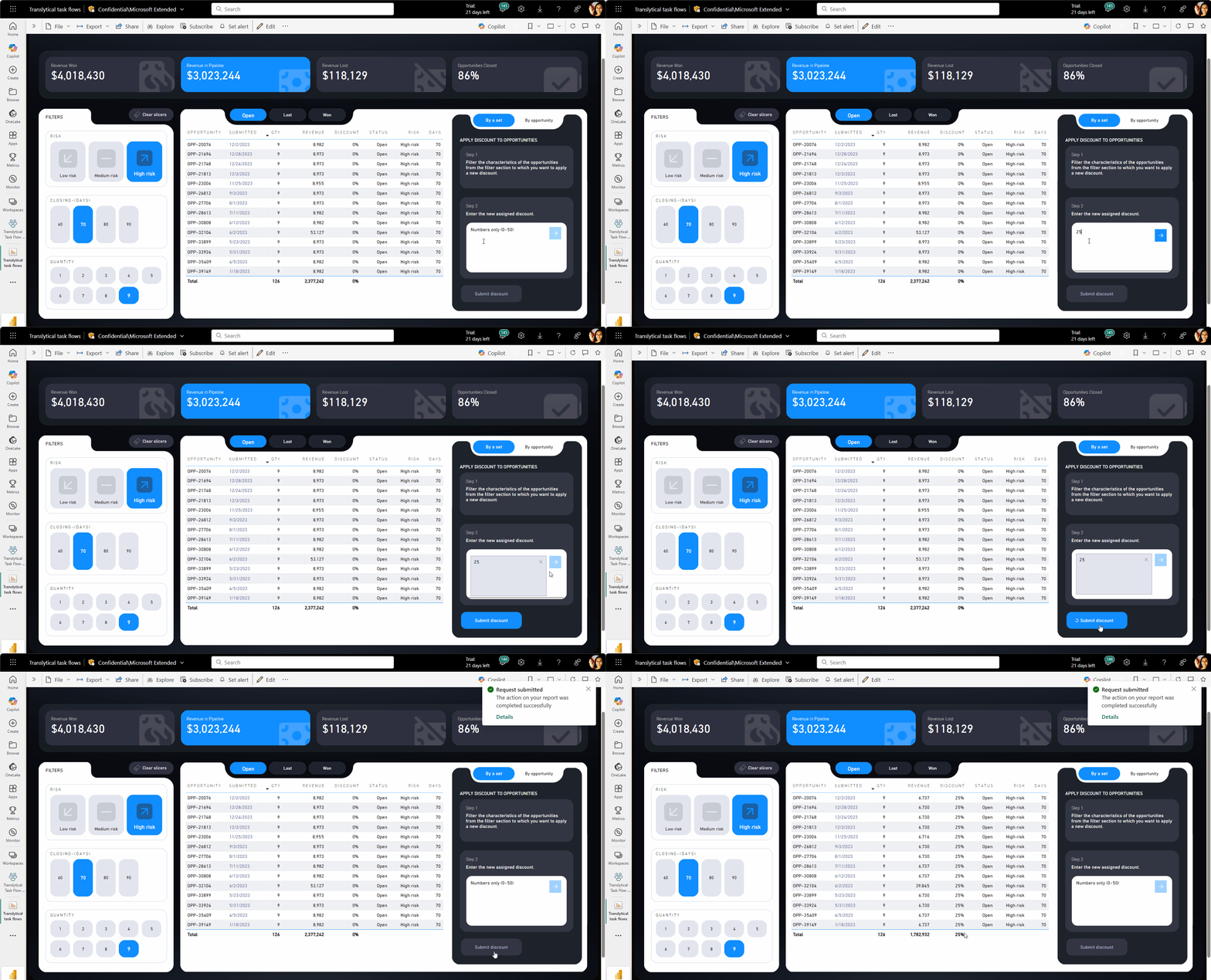
How it Works Users can programmatically update, add, or delete records of data based on the filter context passed from the PBI report. For example, you can modify a discount value directly in a table without leaving Power BI. Simply enter a new value in a text slicer (for now), click “Submit discount,” and a Fabric User data function instantly updates the underlying data source.
Business Impact This eliminates the traditional workflow of: view report → identify issue → open separate system → find relevant records → make changes → return to report to verify impact. Instead, it becomes: view report → make change → see immediate impact.
Documentation Implications When reports become editable, we need to document not just what data means, but what changing that data affects. Which downstream systems will be impacted? What approval processes should be followed? What happens if someone makes a mistake? Has the entire process been reviewed and validated by all stakeholders across the involved applications?
3.2. Data Annotation: Adding context in real-time
How it Works Users can add, edit or delete annotations about each month’s sales data. To add a new data annotation, you select the datapoint, input your comment, and then submit, and it appears immediately on the report.
Business Impact Data annotation allows users to add contextual notes directly to data points within reports. A finance analyst reviewing monthly sales figures can click on a specific month and add a note explaining why performance was unusual (perhaps due to a marketing campaign or supply chain disruption.)
Documentation Implications Annotations become living documentation within the report itself. We need to establish standards for annotation quality, retention policies, and moderation workflows. How long do annotations persist? Who can edit others’ comments? What happens to annotations when underlying data changes?
Maxim Anatsko’s Line Chart Annotation Demo - Shows how to annotate line charts with native writeback
3.3. Dynamic notifications : Automated alerts and communications
How it Works Changing an offer status to ‘Accepted’ will automatically send a dynamic marketing email to the partner company’s point of contact. The system can trigger notifications, emails, or messages based on data changes or user actions within the report.
Business Impact Stakeholders stay informed without manual communication overhead. When a regional sales target is achieved, relevant team members are automatically notified. Critical thresholds trigger immediate alerts to appropriate decision-makers.
Documentation Implications We must document notification triggers, recipient lists, escalation paths, and failure scenarios. What happens when an email fails to send? Who monitors notification health? How do we prevent notification spam during bulk data updates?
3.4. Approval worfklows: Embedded decision processes
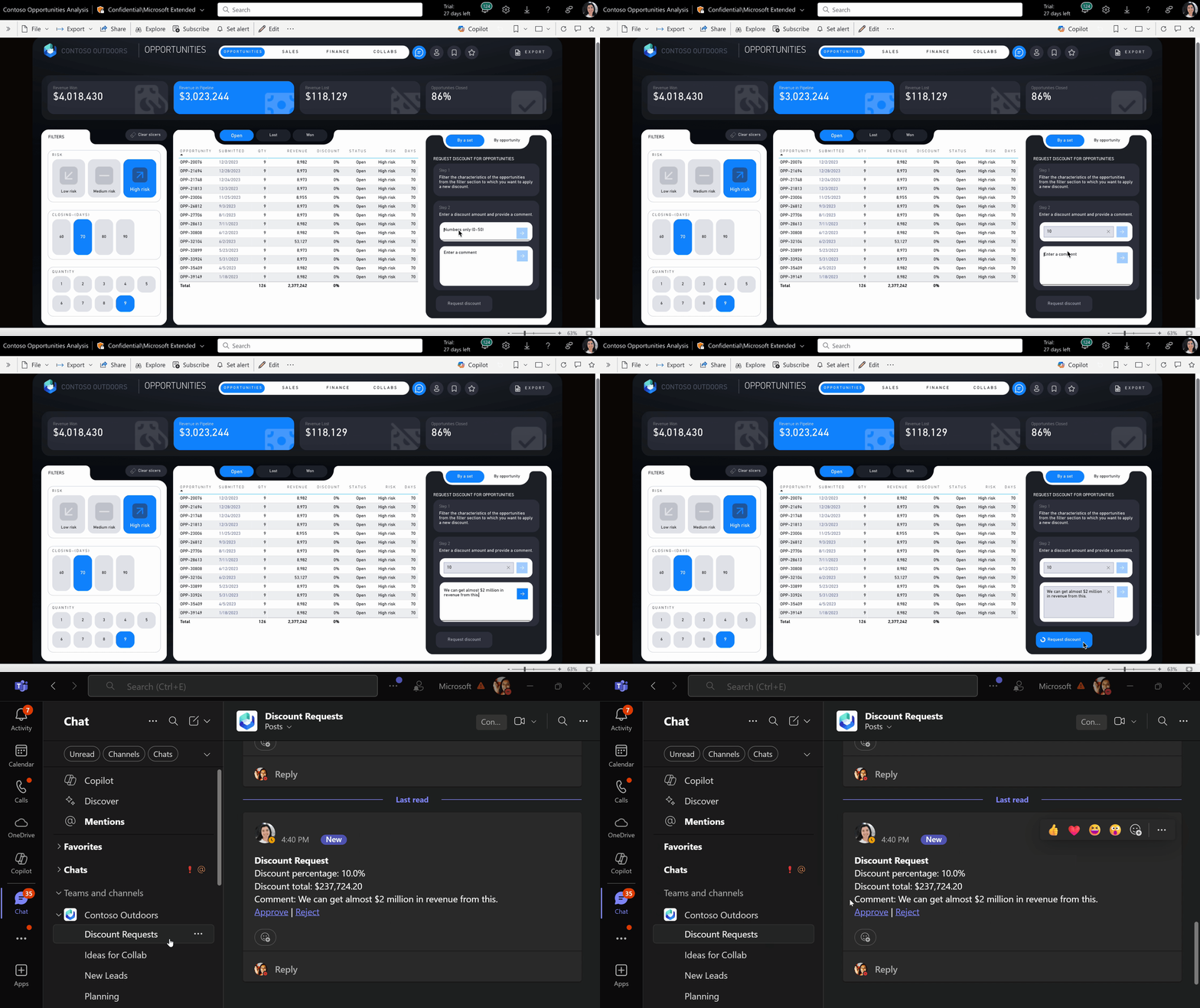
How it Works Non-admin users can propose a discount and submit it as request such that an admin will be notified of the request. The system routes requests to appropriate approvers based on business rules and data context.
Business Impact Approval processes become data-driven and contextual. A discount request automatically includes the customer’s purchase history, current inventory levels, and competitive pricing data. Approvers make informed decisions with full context readily available.
Documentation Implications We need comprehensive workflow documentation covering approval hierarchies, timeout procedures, audit trails, and exception handling. What happens when an approver is unavailable? How are approval decisions tracked and reported?
3.5. External API Integration: Connection beyond Power BI
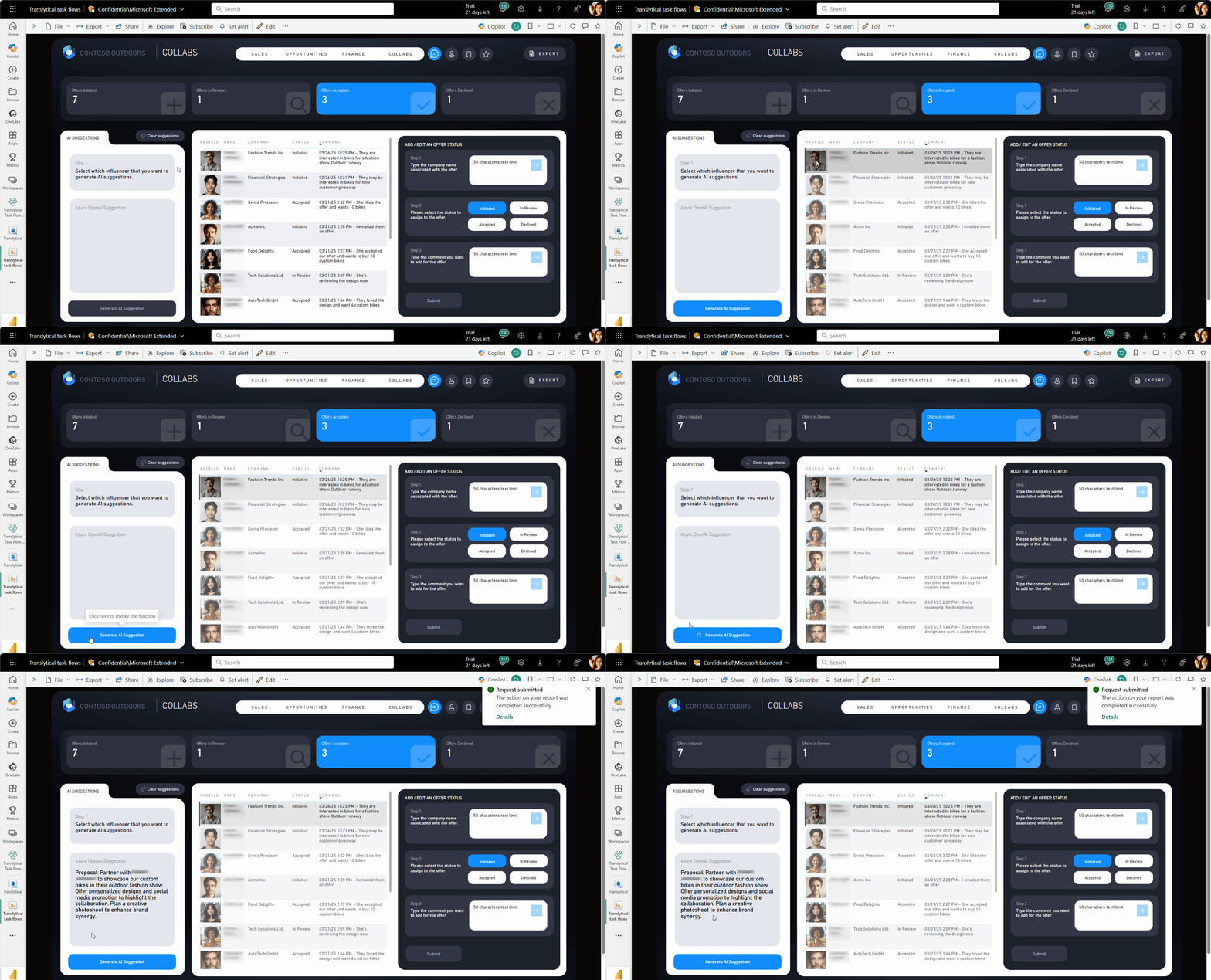
How it Works Make an API request that’s accessible through a network request. For example, making a request to the REST endpoint of a public API that either updates the underlying data or end user’s input, or takes action in a different system. This includes integration with Azure OpenAI for AI-generated suggestions or connections to external business systems.
Business Impact Power BI becomes a central command center connecting multiple business systems. Users can update CRM records, trigger manufacturing orders, or generate AI-powered recommendations without context-switching between applications.
Documentation Implications API integrations introduce complex dependencies requiring detailed technical documentation. We must document API endpoints, authentication methods, rate limits, error handling, and fallback procedures. Each integration point becomes a potential failure that needs monitoring and recovery procedures.
3.6. Custom automation: Tailored business logic
How it Works Using user data functions in Fabric to invoke functions on the underlying Fabric data sources, organizations can build custom automation that fits their specific business processes and requirements.
Business Impact Organizations can automate unique business processes that don’t fit standard templates. Custom logic can handle complex calculations, multi-step workflows, or industry-specific requirements that generic solutions can’t address.
Documentation Implications Custom automations require the most comprehensive documentation since they’re unique to each organization. We need to document business logic, technical implementation, testing procedures, and maintenance requirements. This documentation becomes critical for continuity when developers leave or systems need updates.
4. Step-by-step implementation guide
If you want to follow step-by-step video instructions, please refer to the How to Power BI video.
- Microsoft Tutorial - Step-by-step guide for creating translytical task flows
4.1 Prerequisites
Before you begin, ensure you have
- Existing Fabric capacity (small F2 capacity can work)
- A Power BI Pro license (for the Power BI report creator + if SKUs smaller than F64, a Power BI Pro or Premium Per User license for each user consuming Power BI content )
- SQL database enabled for tenant
- Appropriate permissions for creating User Data Functions
4.2 Implementation Overview
Creating a Translytical Task Flow requires three main tasks:
- Store Data: - Set up your data infrastructure
- Develop Data: - Create User Data functions
- Visualize Data: - Build the Power BI report
Step 1: Create a SQL Database
Follow Microsoft’s guide: Create a SQL Database in Fabric
This database will serve as both your data source and the target for write-back operations.
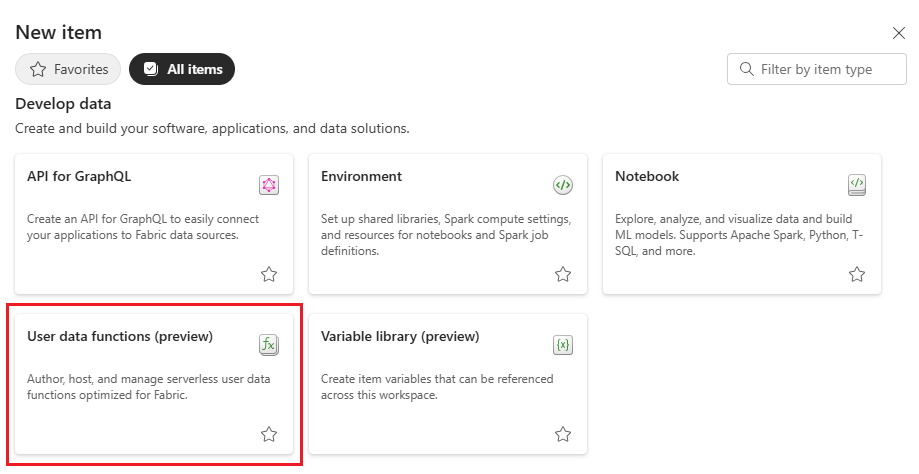
Step 2: Create a User Data Function
- Navigate to your Fabric workspace
- Select “New Item” → “User Data Functions”
Provided Python code for UDF
import fabric.functions as fn
import uuid

udf = fn.UserDataFunctions()

@udf.connection(argName="sqlDB",alias="<REPLACE_WITH_CONNECTION_ALIAS>")
@udf.function()

# Take a product description and product model ID as input parameters and write them back to the SQL database
# Users will provide these parameters in the PowerBI report
def write_one_to_sql_db(sqlDB: fn.FabricSqlConnection, productDescription: str, productModelId:int) -> str:

    # Error handling to ensure product description doesn't go above 200 characters
    if(len(productDescription) > 200):
        raise fn.UserThrownError("Descriptions have a 200 character limit. Please shorten your description.", {"Description:": productDescription})

    # Establish a connection to the SQL database
    connection = sqlDB.connect()
    cursor = connection.cursor()

    # Insert data into the ProductDescription table
    insert_description_query = "INSERT INTO [SalesLT].[ProductDescription] (Description) OUTPUT INSERTED.ProductDescriptionID VALUES (?)"
    cursor.execute(insert_description_query, productDescription)

    # Get the result from the previous query
    results = cursor.fetchall()

    # In real-world cases, call an API to retrieve the cultureId
    # For this example, generate a random Id instead
    cultureId = str(uuid.uuid4())

    # Insert data into the ProductModelProductDescription table
    insert_model_description_query = "INSERT INTO [SalesLT].[ProductModelProductDescription] (ProductModelID, ProductDescriptionID, Culture) VALUES (?, ?, ?);"
    cursor.execute(insert_model_description_query, (productModelId, results[0][0], cultureId[:6]))

    # Commit the transaction
    connection.commit()
    cursor.close()
    connection.close()

    return "Product description was added"
Step 3: Configure Database Connection
- Connect to your SQL database
- Select the AdventureWorksLT SQL dataset (either load it up with your own data, or use the sample data provided by Microsoft)
- Replace the alias placeholder in your UDF with the actual alias value
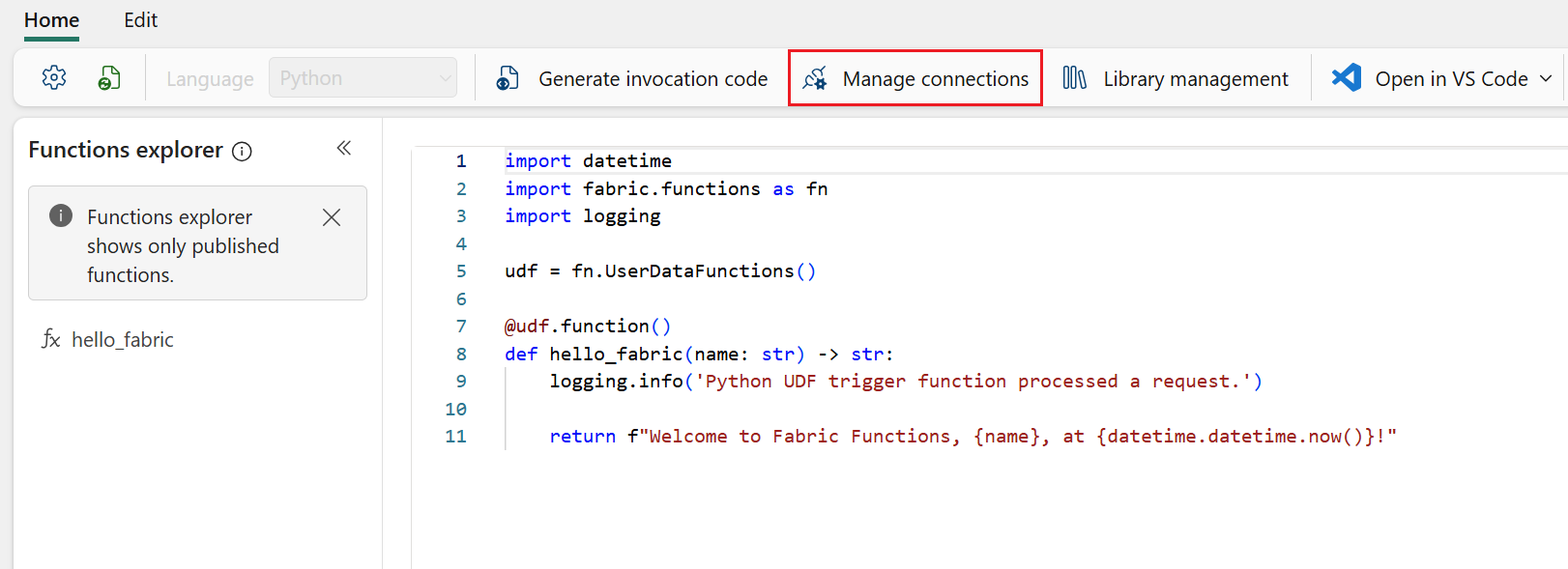
Step 4: Test Your Function
Before proceeding to Power BI integration:
- Test the function with sample data
- Verify error handling works correctly
- Check rollback procedures
Step 5: Grant User Permissions
Set up appropriate permissions for your User Data Function:
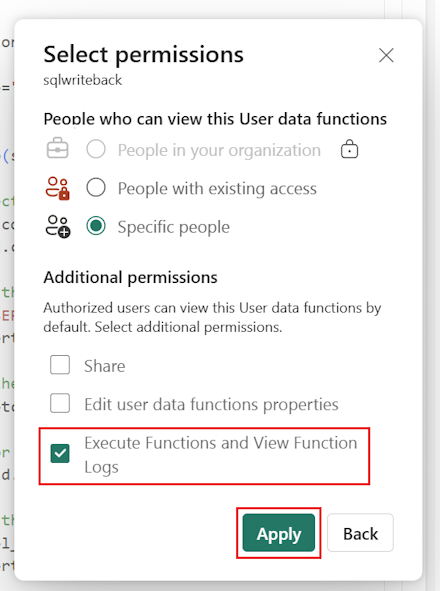
Critical: Follow the principle of least privilege. Only grant permissions necessary for the specific function.
Step 6: Create Your Power BI Report
- Open Power BI Desktop
- Connect to your Fabric data source
- Build your visualizations
- Add interactive elements (slicers, text inputs)
- Configure buttons with Data Function actions
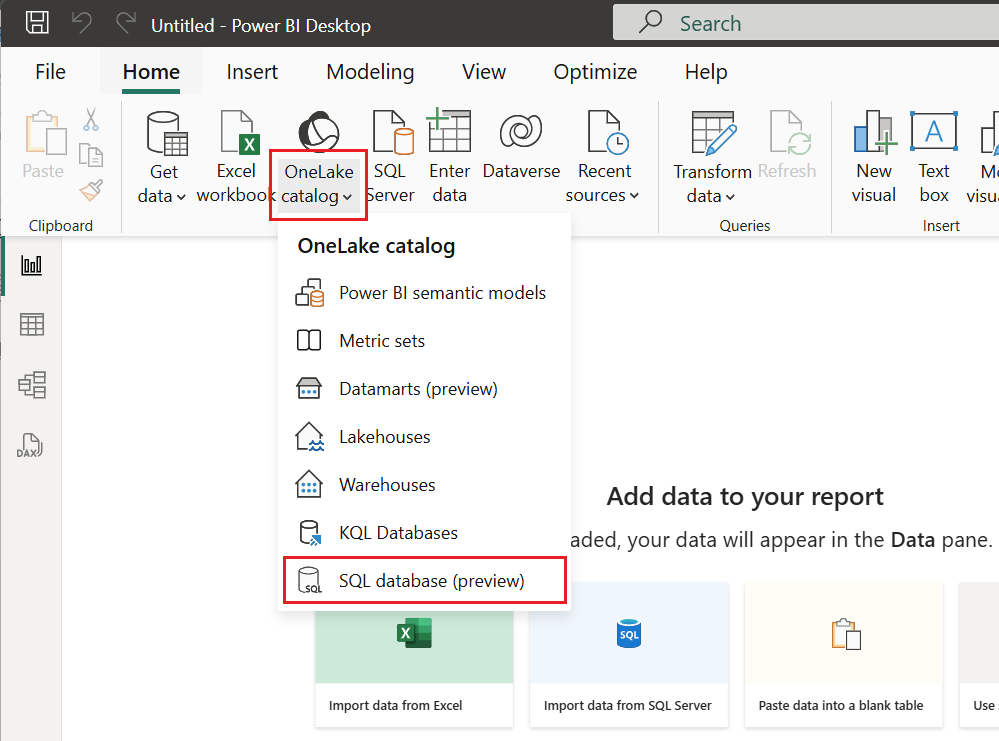
Step 7: Configure Button Actions
- Select your action button
- Set Action Type to “Data Function”
- Configure the function parameters
- Test the integration
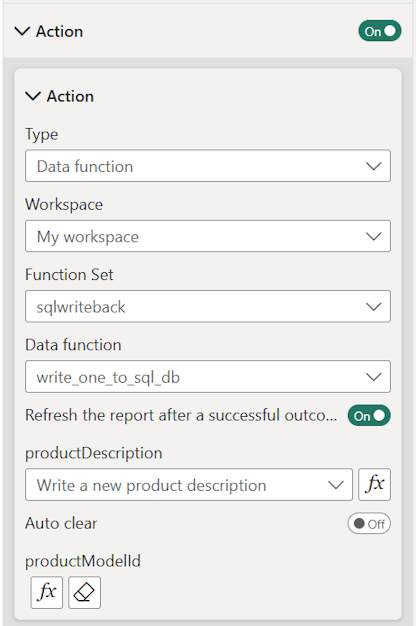
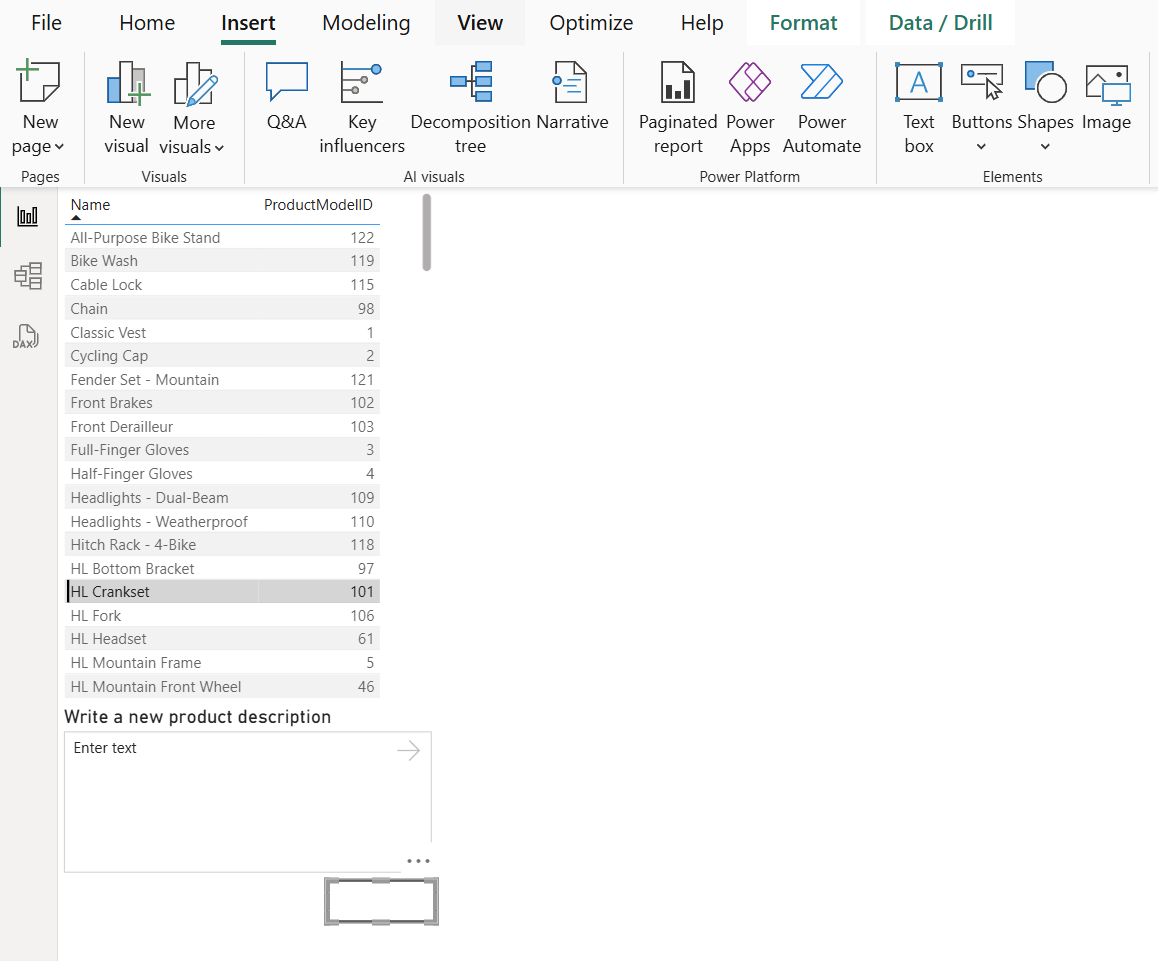
Final Result
Your completed report should allow users to input data and trigger actions directly within Power BI:
Implementation Best Practices
- Start small: Begin with a single, simple function
- Test thoroughly: Validate always before deployment
- Document everything: Create comprehensive documentation before deployment
- Plan for rollback: Always have a way to undo actions (backup plan)
- Monitor Actively: Set up logging and alerting from day one
5. Why Documentation matters more than ever
When your reports can change real data, start business processes, and affect multiple systems, letting “users figure it out” becomes dangerous.
[!Warning] Translytical reports can affect multiple systems at once.
5.1 Traditional vs. Translytical risk
Regular Power BI Reports
- Impact: Affect understanding only
- Failure Mode: Users get confused
- Recovery: Clarify interpretation
- Risk Level: Low
Translytical Reports
- Impact: Affect multiple systems simultaneously
- Failure Mode: Users can accidentally cause serious business problems
- Recovery: Complex system restoration required
- Risk Level: High
One button click might update customer records, start approval processes, send emails to partners, or change financial data.
Put simply: When regular reports lack documentation, users get confused. When Translytical reports lack documentation, users can accidentally cause serious business problems. The risks have dramatically increased.
5.2 New categories of risk
We now face entirely new types of problems
Operational Risks
- Users starting actions they don’t understand
- Actions succeeding partially, leaving systems in inconsistent states
- Cascade failures where one action triggers multiple downstream problems
Security Risks
- Unauthorized access to action capabilities
- Privilege escalation through report functions
- Data exposure through poorly designed functions
Compliance risks
- Audit trail gaps in action execution
- Regulatory violations through improper workflows
- Data integrity issues from uncontrolled modifications
5.3 Documentation as risk mitigation
Good documentation isn’t just nice to have anymore, it’s essential for operational safety.
Every undocumented action could disrupt operations. Every unclear process could create security risks. Every missing error scenario could cause compliance failures.
5.4 The business case for investment
Companies need to change from thinking “documentation is optional” to “documentation is business critical.” This requires:
- Higher investment: More time, people, and clear processes
- Different review processes: Technical and business validation
- Serious accountability: Clear ownership and responsibility
5.5 When things go wrong
When Translytical reports break, the first question won’t be “What does this chart mean?”
It will be: “What did this action do, what systems did it affect, and how do we restore everything?”
[!Note] Your documentation needs to help fix problems and build trust, not just teach users.
5.6 Operational procedures, not user guides
This means documenting more than just what actions do:
- Impact Documentation: What systems and processes are affected
- Monitoring Procedures: How to track action execution (ideally in real time)
- Recovery Procedures: How to reverse or repair when things go wrong
- Escalation Paths: Who to contact for different types of failures
5.7 The new ways for documentation
The era of “we’ll document it later” is finished. When your reports can execute real actions, your documentation must be perfect before rollout and operational use.
6. How documentation requirements transform
The shift from viewing reports to taking action directly from the Power BI report changes everything about documentation: what we document, how we do it, and who needs it.
6.1 Traditional Power BI documentation framework
In our earlier Power BI docs series on GitHub, Greg and I covered the following standard documentation topics:
1. Technical Implementation
Data & Model Architecture
- Data relationships and calculations
- DAX measures and calculated columns
- Data source connections and lineage
- Gateway & connections configuration
- Model optimization and performance
- Data quality checks and referential integrity
Report Design & Functionality
- Visual interactions and formatting
- How to use reports and navigate
- Filters and drill-through features
- Bookmarks and navigation design
- DAX patterns and dependencies
2. Process & Operations
Data Management
- Data refresh timing and scheduling
- Workflow documentation (data flow from source to report)
- Data validation and testing procedures
- Environments management (DEV, TEST, PROD)
Governance & Control
- User permissions and security
- Report sharing and workspace access
- Version control and change management
- Issues tracking and resolution history
- Business rules and calculation definitions
3. Deployment & Maintenance
Release Management
- Deployment procedures and environments
- Automated testing implementation
- Performance monitoring and optimization
- Troubleshooting display issues and procedures
Quality Assurance
- Validation and acceptance testing
- Best practices compliance
- Integration with external tools and APIs
4. Business Alignment
Requirements & Purpose
- How the report answers business needs/requirements
- Success metrics and KPI definitions
- Stakeholder requirements and sign-offs
User Experience
- User onboarding and training materials
- Accessibility considerations
- Feedback collection mechanisms
- Adoption tracking and user support
5. Continuous Improvement
Monitoring & Analytics
- Usage analytics and performance metrics
- User feedback and enhancement requests
- Success metrics and adoption tracking
Evolution & Growth
- Future roadmap and planned enhancements
- Lessons learned and best practices
- Knowledge transfer and documentation updates
[!Note] This framework treats documentation as a “living document” that evolves throughout the entire project lifecycle, from initial requirements gathering through ongoing operational use and enhancement.
6.2 Translytical documentation requirements
Translytical docs need all the traditional elements PLUS
Process related to integration documentation
- Business processes triggered by actions
- How systems connect and depend on each other
- Cross-system workflow coordination
- Integration failure scenarios
Operational safety documentation
- What to do when things break
- System restoration procedures
- Rollback and recovery processes
- Emergency contact procedures
Governance & compliance documentation
- Security rules and approval chains
- Audit trail requirements
- Compliance verification procedures
- Risk assessment frameworks
Performance & monitoring documentation
- Performance impacts and planning
- Monitoring and alerting setup
- Capacity planning considerations
- Resource utilization tracking
6.3 The role evolution
We’re expanding the role of Power BI reports
- Before: They were the final step in a process
- Now: They manage entire processes, tools, and integrations
New documentation types required
Function Documentation
Every UDF needs comprehensive documentation including:
- Purpose & context: What it does and why it exists
- Input specifications: Required parameters and validation rules
- Output documentation: Expected results and side effects
- Error handling: How errors are managed and communicated
- System dependencies: What external systems it touches
- Performance characteristics: Execution time and resource requirements
- Testing procedures: How to validate functionality
- Change history: Version control and modification tracking
This is significantly more complex than documenting DAX measures because we’re documenting components that interact with external systems and have real business impact.
Action process documentation
Each Translytical action needs step-by-step process documentation covering:
- User workflows: Complete user journey from start to finish
- Decision points: Where users make choices and what those choices mean
- System touchpoints: diagrams showing how data moves between systems.
- Change management: Process for updating or modifying translytical workflows. Double-check consistency and dependencies as the process evolves.
- Approval requirements: Who needs to approve what and when
- Data validation: Rules for ensuring data integrity before actions execute
- Success validation: How to confirm actions completed successfully
- Failure recovery: What to do when things go wrong
We’re combining business process documentation with analytics documentation, a complexity level we’ve never handled before.
6.4 Documentation Complexity Matrix
| Traditional BI | Translytical BI |
|---|---|
| Static artifacts | Dynamic processes |
| Single system impact | Multi-system impact |
| User understanding focus | Operational safety focus |
| Periodic updates | Real-time monitoring |
| Information sharing | Risk management |
7. Best practices for Translytical documentation
7.1 Document before you code
This might sound obvious, but too many Power BI developers jump straight into development without clearly documenting what they’re trying to achieve or knowing the priority or order of things to develop. With Translytical, this approach is particularly dangerous because the complexity isn’t just in the code, it’s in the business process the code enables to do.
Pre-development documentation requirements
Before writing a single line of Python code in an UDF, document:
- Business Scenario: The specific business problem you’re addressing
- Current State: The manual process you’re replacing
- Future State: The expected user workflow after implementation
- Impact Analysis: The systems and data that will be affected
- Success Criteria: How you’ll measure successful implementation
- Failure Recovery: What steps will be taken if the process fails?
The translytical action specification
I recommend creating a one-page “Translytical Action Specification” document for each function UDF. This forces you to think through the implications before you start building.
Template Structure:
Action Name: [Clear, descriptive name]
Business Purpose: [Why this action exists]
Trigger Conditions: [When this action should execute]
Input Requirements: [What data/parameters are needed]
Processing Logic: [High-level description of what happens]
Output/Results: [What the action produces or changes]
Risk Assessment: [What could go wrong]
Rollback Plan: [How to undo if necessary]
7.2 Establish naming and commenting standards
Unlike DAX measures where naming conventions are helpful and best practice but not business critical, Translytical functions need rigorous naming standards because they’ll be referenced potentially in multiple Power BI reports and will be possibly maintained by different team members over time.
Recommended naming conventions
- Business Domain Prefix: Sales_, Finance_, Operations_, HR_
- Action Type Identifier: Update_, Create_, Notify_, Approve_, Delete_
- Descriptive Suffix: DiscountPercentage, InventoryAlert, BudgetRequest
Examples
Sales_Update_DiscountPercentageFinance_Approve_BudgetRequestOperations_Notify_InventoryAlert
Code commenting requirements
Code commenting becomes critical because these functions often contain business logic that’s not obvious from the code itself.
[!Note] Document not just what the code does, but why specific business rules are implemented the way they are.
example
# Business Rule: Discounts above 20% require manager approval
# Source: Sales Policy Document v2.3, Section 4.1
if discount_percentage > 0.20:
    trigger_approval_workflow(request_details)
7.3 Version control and change management
UDF Versioning strategy
Every UDF should follow semantic versioning:
- Major: Breaking changes to function or behavior
- Minor: New functionality
- Patch: Bug fixes, no functionality changes
Change documentation requirements
For every function change, document:
- What changed: Specific modifications made
- Why changed: Business justification for the change, and the requester name and validation
- Impact assessment: What systems/processes are affected
- Testing Results: Validation that changes work correctly
- Rollback Plan: How to revert if problems occur
7.4 Security and access documentation
Permission Matrix
Create and maintain a clear permission matrix showing:
| Function | Execute | Approve | Monitor | Modify |
|---|---|---|---|---|
| Sales_Update_Discount | Sales Team | Sales Managers | All | Developers |
| Finance_Approve_Budget | Finance Team | CFO | All | Developers |
| Operations_Notify_Alert | Operations | Operations Mgr | All | Developers |
Security review checklist
For each UDF function, document:
- Who can execute this function?
- What data can they access?
- What systems can they modify?
- Are there approval requirements?
- How is access monitored?
- What happens if access is misused?
7.5 Error handling and recovery documentation
Error scenario mapping
For each UDF function, document common error scenarios:
- Input validation errors: What happens with bad data
- System connection errors: What happens when external systems are unavailable
- Business logic errors: What happens when business rules fail
- Permission errors: What happens when users lack required access
Recovery procedures
For each error type, provide:
- Detection methods: How to identify the problem occurred
- Immediate actions: What to do right away
- Investigation steps: How to diagnose the root cause
- Resolution procedures: How to fix the problem
- Prevention measures: How to avoid similar issues in the future
7.6 Testing documentation standards
Test case requirements
Every UDF function needs documented test cases covering:
- Happy path: Normal operation with valid inputs
- Edge cases: Boundary conditions and unusual inputs
- Error conditions: Invalid inputs and system failures
- Performance tests: Function execution under load
- Integration tests: Interaction with other systems
Test results documentation
Maintain records of:
- Test execution dates: When tests were run
- Test results: Pass/fail status for each test case
- Performance metrics: Execution time and resource usage
- Issue tracking: Problems found and resolution status
8. Practical Implementation Approach
Building Translytical capabilities without an implementation approach is like building a house without blueprints. You might end up with something functional, but it probably won’t be maintainable, scalable, or safe.
Here’s the practical approach I recommend:
Before implementing any Translytical capabilities, establish your documentation infrastructure. This should include:
- Creating standardized templates for different types of documentation
- Establishing version control and change management processes
- Setting up cross-referencing and linking capabilities
- Defining review and approval workflows
- Ensuring rollback for any foreseen or unforeseen situation
- Having a strategy in mind regarding monitoring logs, frequency of use of this new feature, etc.
I recommend starting with a pilot project and comprehensive documentation, especially since this new feature is still in very early preview. Avoid rushing any project into production. Take time to establish solid processes, anticipate potential issues, and create bulletproof documentation and monitoring procedures. Consider implementing a knowledge management system like Obsidian (more details coming soon).
Team skills assessment and training Translytical implementations require a broader skill set than traditional Power BI development. Assess your team’s capabilities in:
- Function development and debugging
- API integration and error handling
- Business process design and documentation
- Security implementation and validation
- Performance monitoring and optimization
Identify skill gaps early and plan training accordingly. Don’t assume that strong Power BI developers will automatically be strong Translytical developers. The additional complexity requires different skills and mindset.
8.1 Implementation Timeline and Milestones
| Month | Milestone | Key Deliverables |
|---|---|---|
| 1 | Infrastructure Setup | Documentation templates, development environment |
| 2 | Pilot Development | First function created and tested |
| 3 | User Testing | Feedback collected, documentation refined |
| 4 | Production Readiness | Monitoring setup, rollback procedures |
| 5 | Limited Production | Single function live with monitoring |
| 6 | Evaluation | Success metrics assessed, lessons learnt documented |
| 7 | Scaled Rollout | Multiple functions, broader adoption |
9. Future Evolution: AI and dynamic documentation
As Translytical capabilities mature and become more widely adopted, the documentation landscape will continue to evolve. Understanding these trends helps organizations prepare for the future rather than constantly playing catch-up.
AI-Assisted documentation generation
Code-to-Documentation Automation We’re already seeing early examples online of AI tools that can generate partial documentation from .BIM / TMDL / Power BI metadata extractions. As Translytical functions become more standardized, AI tools will become increasingly effective at generating base documentation that human reviewers can refine and enhance.
I expect to see AI tools that can:
- Generate function documentation generating bulletproof code and comments
- Create process flow diagrams from function logic
- Identify integration dependencies automatically
- Suggest test scenarios based on function complexity
- Flag potential documentation gaps or inconsistencies
The key insight is that AI will/could augment human documentation efforts, without really replacing them. The business context, process implications, and strategic considerations still require human understanding and documentation.
Dynamic documentation updates AI tools will also enable more dynamic documentation maintenance. Instead of periodic manual reviews, AI systems could continuously monitor function behavior, system integrations, logs, and user interactions to identify when documentation needs updates.
9.1 Preparing for the future
Investment Strategies
Organizations should consider:
Technology Infrastructure
- Documentation platforms that can integrate with AI tools
- Version control systems that support dynamic updates
- Collaboration tools that enable real-time editing
- Analytics platforms for documentation usage tracking
Skills Development
- Training teams on AI-assisted documentation tools
- Developing expertise in conversational interface design
- Building capabilities in advanced workflow design
- Creating centers of excellence for Translytical development
Process Evolution
- Adapting documentation processes for AI assistance
- Creating feedback loops for continuous improvement
- Establishing governance for AI-generated content
- Building quality assurance for dynamic documentation
10. Conclusion: Documentation as a strategic asset
As I finish writing this long blog-post, I’m struck by how far we’ve come from the early days of Power BI when documentation was completely ignored or just an afterthought. We’ve moved from “users can figure it out” to “comprehensive documentation is essential.” This evolution reflects not just the growing impact of Power BI capabilities, but a fundamental shift in how we think about analytics in the enterprise. We evolved, adapted, and improved our ways of working.
Translytical capabilities represent more than a new feature, it represents a new paradigm where analytics becomes operational infrastructure. When your reports can modify production systems, coordinate business processes, and trigger automated workflows, documentation stops being a support function and becomes a strategic capability.
Organizations that recognize this shift early and invest appropriately in documentation infrastructure, processes, and expertise will have significant competitive advantages. They’ll implement Translytical capabilities faster, more safely, and more effectively than organizations that treat documentation as an afterthought.
10.1 Risk mitigation as competitive advantage
In the Translytical era, superior documentation practices become a competitive advantage through risk mitigation. Organizations with comprehensive documentation can:
- Implement complex capabilities with lower operational risk
- Respond to incidents faster and more effectively
- Scale implementations more rapidly
- Maintain compliance more easily
- Train users more efficiently
These capabilities translate directly into business value through reduced operational costs, faster time-to-market, and improved business agility.
10.2 The investment imperative
People and Process Investment
Successfully implementing Translytical capabilities requires investment not just in technology, but in people and processes. Organizations need:
- SMEs who understand both technical and business requirements
- Process designers who can create effective workflows
- Training specialists who can educate users on complex capabilities
- Governance specialists who can maintain operational safety
These aren’t traditional Power BI roles, and organizations that try to add these responsibilities to existing job descriptions without appropriate support and training will struggle.
Infrastructure and Tool Investment
The documentation requirements for Translytical capabilities exceed what most organizations can handle with traditional documentation tools. Investments in performant documentation platforms, version control systems, collaboration tools, and automation capabilities become necessary rather than optional.
Organizations should budget for documentation infrastructure preparation as part of their Translytical implementation costs, not as a separate initiative that happens afterward.
10.4 Final Thoughts: Documentation as strategic differentiator
We’ve covered a lot of ground in this blogpost, from understanding what Translytical is and how it works, to exploring the documentation implications and best practices for implementation. The core message throughout has been that Translytical represents a fundamental shift that requires new approaches to documentation.
But the deeper message is that documentation itself is evolving to becoming a strategic differentiator. Organizations that recognize this evolution and invest time in setting it up appropriately will be better positioned not just for Translytical success, but for the broader digital transformation challenges that lie ahead.
The question isn’t whether your organization will eventually implement action-enabled analytics capabilities, it’s whether you’ll be ready with the documentation infrastructure, processes, and expertise to do it successfully when the time comes.
10.5 Call to Action
Start building that capability now, while the stakes are still relatively low and you have time to learn and iterate.
Specific actions to take
- Read Microsoft documentation: Understand the technical capabilities and requirements
- Build a Proof of Concept: Create a simple pilot to understand the implications
- Document limitations and risks: Create a comprehensive risk assessment
- Follow Microsoft’s evolution: Track updates and community developments
- Save community content: Build a knowledge repository of best practices
The organizations that wait until Translytical capabilities are critical business requirements will find themselves playing catch-up in a game where documentation quality directly affects operational success.
Final Thoughts: The Future is Now
[!Note] The future of analytics is active, integrated, and complex. The future of analytics documentation needs to be equally sophisticated.
Documentation itself is evolving from a support function to a strategic differentiator. Organizations that recognize this evolution and invest appropriately will be better positioned not just for Translytical success, but for the broader digital transformation challenges that lie ahead.
We’re at an inflection point where the quality of our documentation directly impacts our ability to leverage advanced analytics capabilities safely and effectively. The organizations that understand this and act accordingly will define the next era of business intelligence.
[!TIP] The time to start building that future is now.
Key resources & links
1. Microsoft Official Documentation
- Microsoft Tutorial - Step-by-step guide for creating translytical task flows
- Official Announcement Blog - Microsoft’s launch announcement for Translytical Task Flows
2. Community Examples & Demos
- Power BI Tips - Demo heavy video of how Translytical can be used within Power BI.
- How to Power BI - Video on Translytical implementation following the steps provided in Microsoft Documentation
- [Microsoft Fabric Community Gallery](Translytical Task Flow Gallery - Microsoft Fabric Community) - Translytical Task Flow Gallery with specific Python code used for UDF
- Amal Ben Rebai’s LinkedIn Demo - Practical demonstration of data write-back from Power BI
- Maxim Anatsko’s Line Chart Annotation Demo - Shows how to annotate line charts with native writeback
- Jon Vöge - Tutorial showing how to create a simple comment/annotation system
3. Advanced Use Cases
- Peer Grønnerup’s Fabric CLI Integration - Explores using Fabric CLI Python modules within UDFs
- Microsoft Fabric Community Gallery - Official Microsoft community gallery with UDF examples
4. Financial Forecasting Implementation
- Edward Charles’ User Input Tutorial - Building Power BI front-end for budget input using Translytical flows
5. General Task Flow Automation
- Task Flow Automatic Reference - Contains a video link about automation workflows