October 16, 2026 · Alex Badiu
Self-updating documentation with an agentic pipeline and Rayfin
▶️ Watch the demo video (2 min 44 s)
Your documentation is out of date the moment you save it. That’s the reality of today’s documentation. You write it once, the report moves on, and nobody goes back to update it. Six months later that documentation serves no one.
We all know why and we already discussed about this topic in the previous blog articles. Documentation feels like a tax on “real work.” The technical part can be tedious, and the functional part, the why behind a bookmark or a measure for example, lives only in the head of the person who built it. When they leave, the knowledge leaves with them.
So here is the question I wanted to answer.
What if documentation rebuilt itself on every merge, standardized its own quality, and published straight into a living app anyone could browse, next to the semantic model? Not stale files, but a product.
Is this an impossible thing to achieve in this new AI and agentic world?
Let’s dive in.
Why documentation gets out of date so easily
You inherit a Power BI project. You open the docs folder. You find a Word file from last spring, or nothing at all.
The technical facts are recoverable. You can read the model, list the measures, count the visuals. Tedious in a PBIX, more doable in PBIP or using a Fabric notebook.
Here’s the important take away: The functional layer is the real loss. The JSON or TMDL holds none of it.
Why does this bookmark exist? When should someone use it? What happens when they click it?
Nobody captures that in the file.
Even AI-generated documentation drifts. You can generate a beautiful set of docs today. But if nobody re-runs the generation after the next change, you are right back to a snapshot that ages badly.
[!IMPORTANT] The problem was never writing the docs. The problem is keeping them updated.
The Goal: documentation that rebuilds itself on every merge
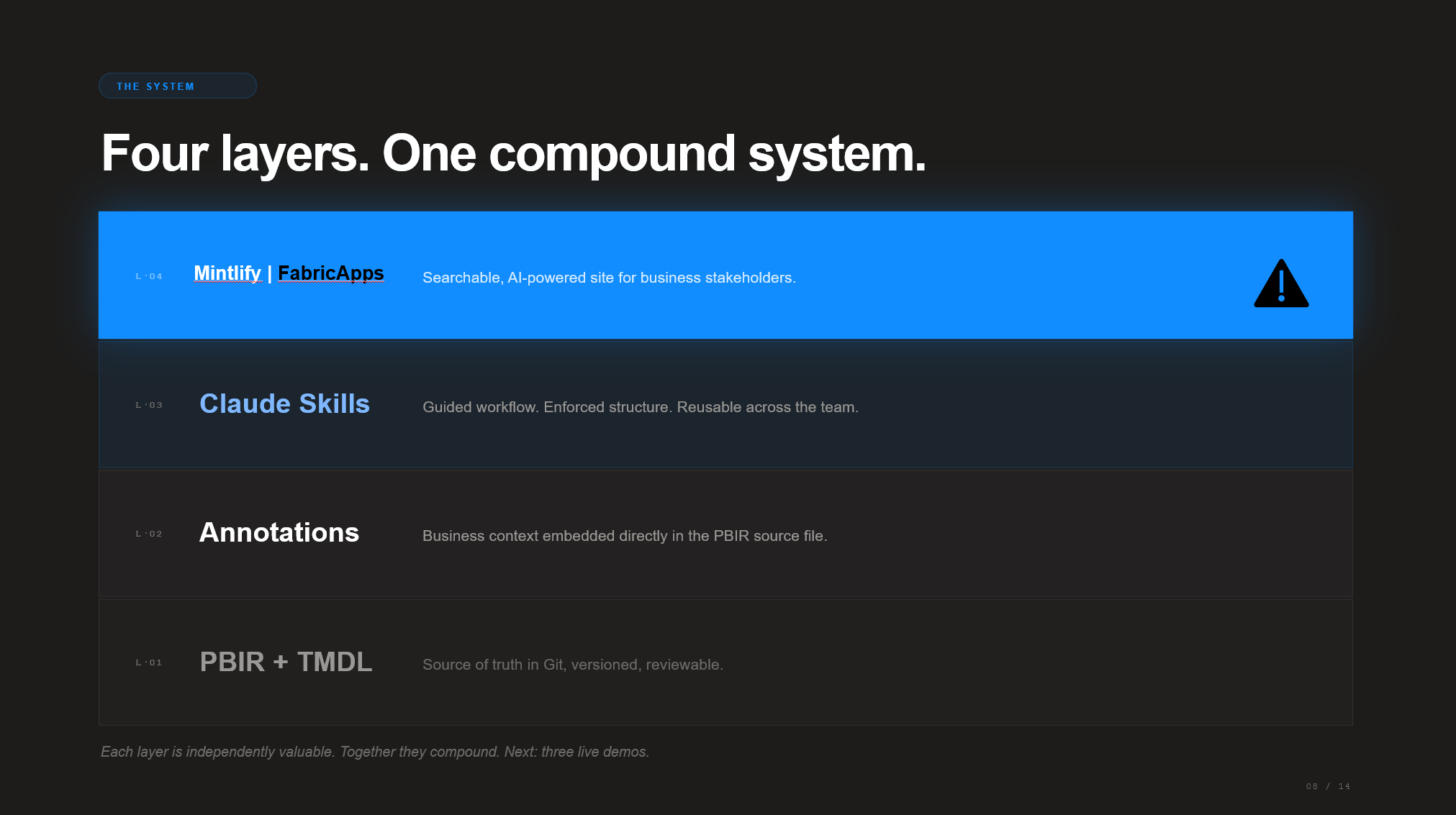
The fix is to stop treating documentation as a deliverable.
You write the source of truth once, inside the root project, next to the thing it describes. That’s where the documentation should always live. From there, an agentic workflow does the rest.
Every time someone merges a change, the pipeline re-reads the project, rebuilds the documentation, validates it, and pushes it into a live Rayfin app. No one copies anything. No one remembers to “update the docs.”
Here is the difference in practice.
| Traditional docs | Self-updating docs | |
|---|---|---|
| Who updates them | A human, eventually, maybe | The pipeline, on every merge |
| Source of truth | A separate file that drifts | The project itself |
| Freshness | Unknown, usually stale | Minutes after the last merge |
| Consistency | Depends on who wrote it | Enforced by a quality gate |
| Where it lives | A folder someone forgets | A live app anyone can browse |
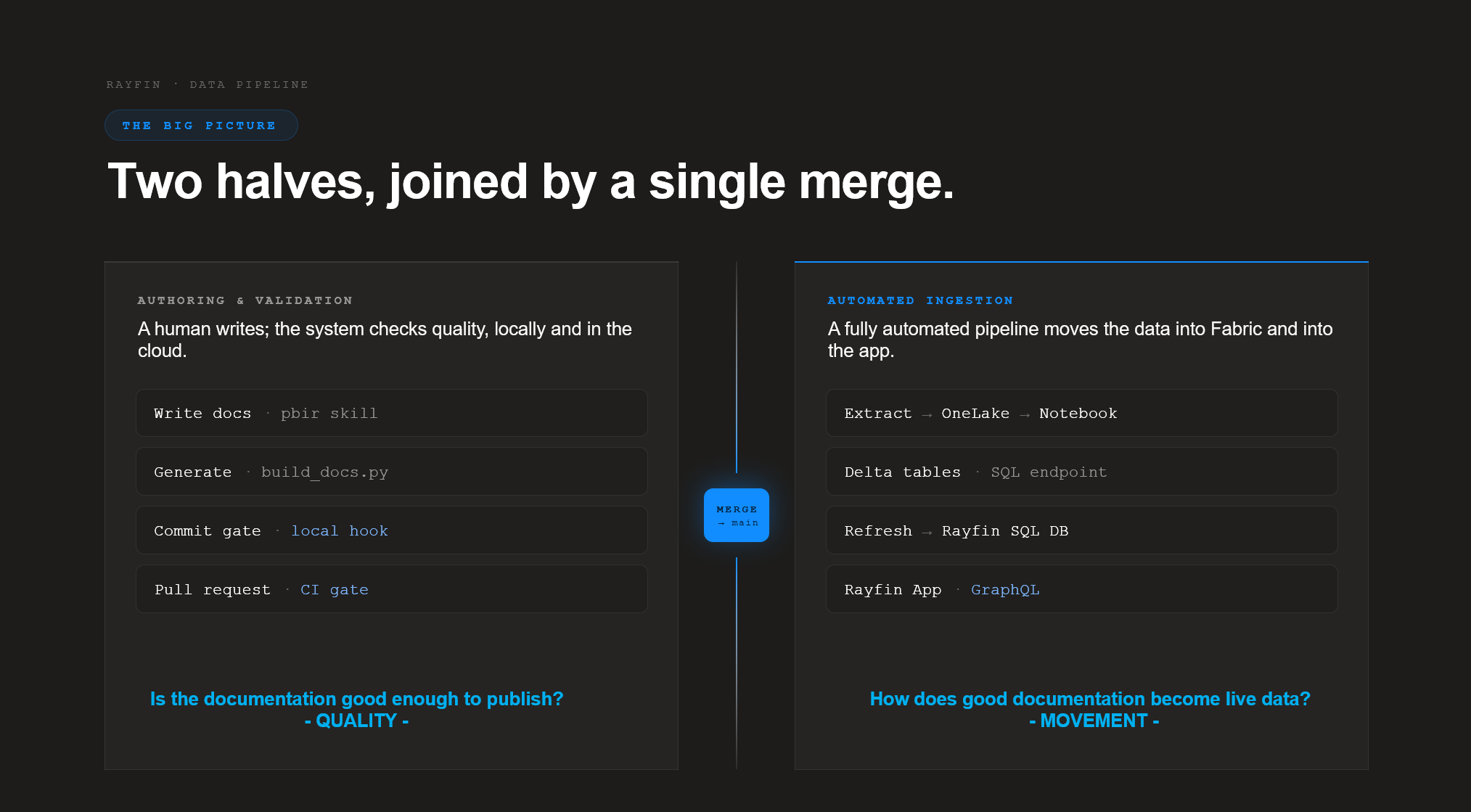
The merge is the trigger. Before the merge, you are writing and checking. After the merge, an automated chain carries the content all the way into a Microsoft Fabric SQL database that backs a real Rayfin web app. The whole run finishes in a couple of minutes.
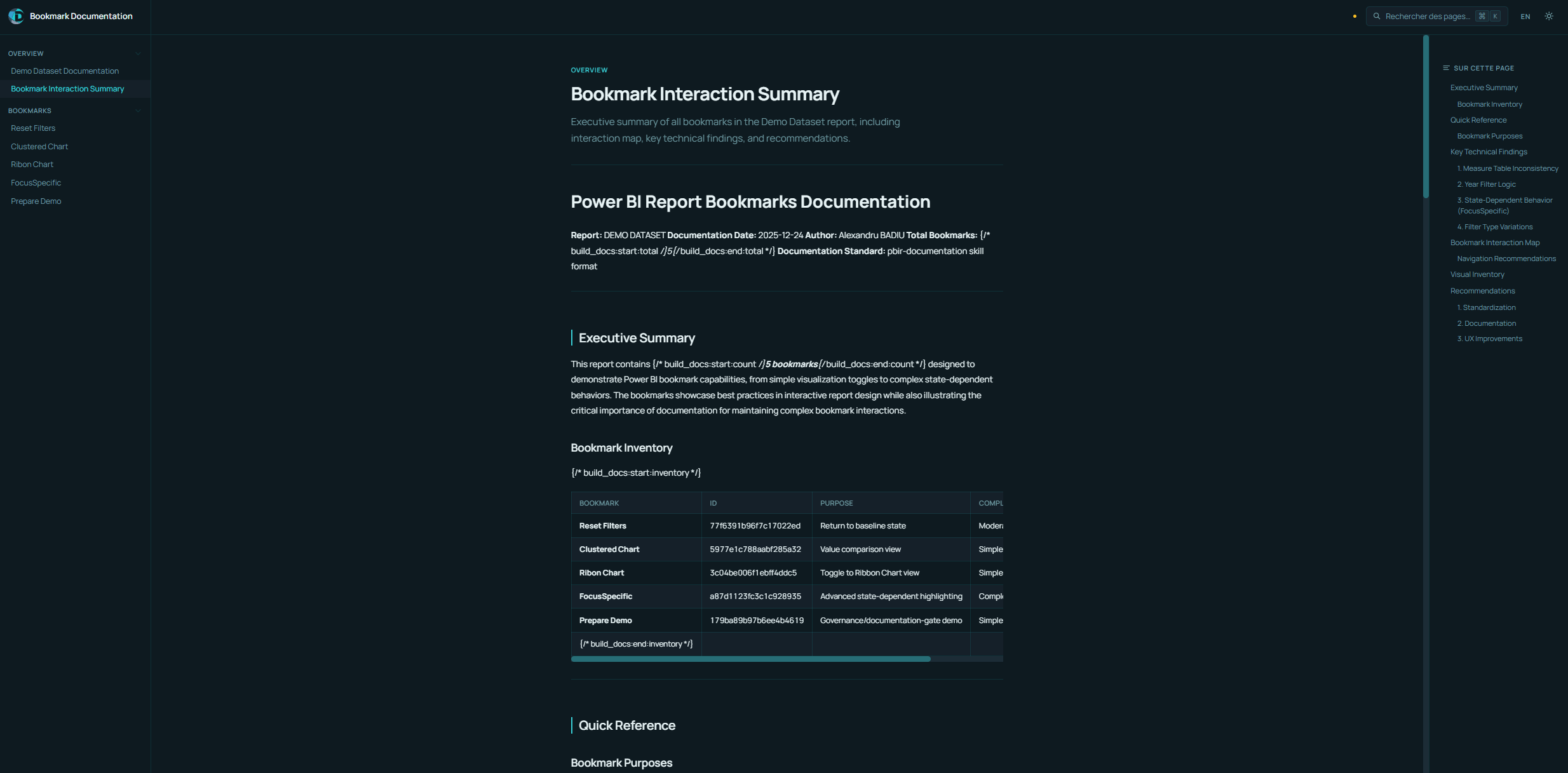
The end process of the described agentic workflow in this blogpost is a Rayfin app that documents bookmarks both on the technical and functional side
[!NOTE] This is a preview of a broader idea. The specific app here runs on Rayfin, Microsoft’s Fabric Apps framework. The pattern, author once and let a pipeline keep everything true, applies far beyond one tool.
Standardizing the “why”: a skill that interviews you
Technical documentation is easy to generate with the right prompt invoked and included in the right skills:
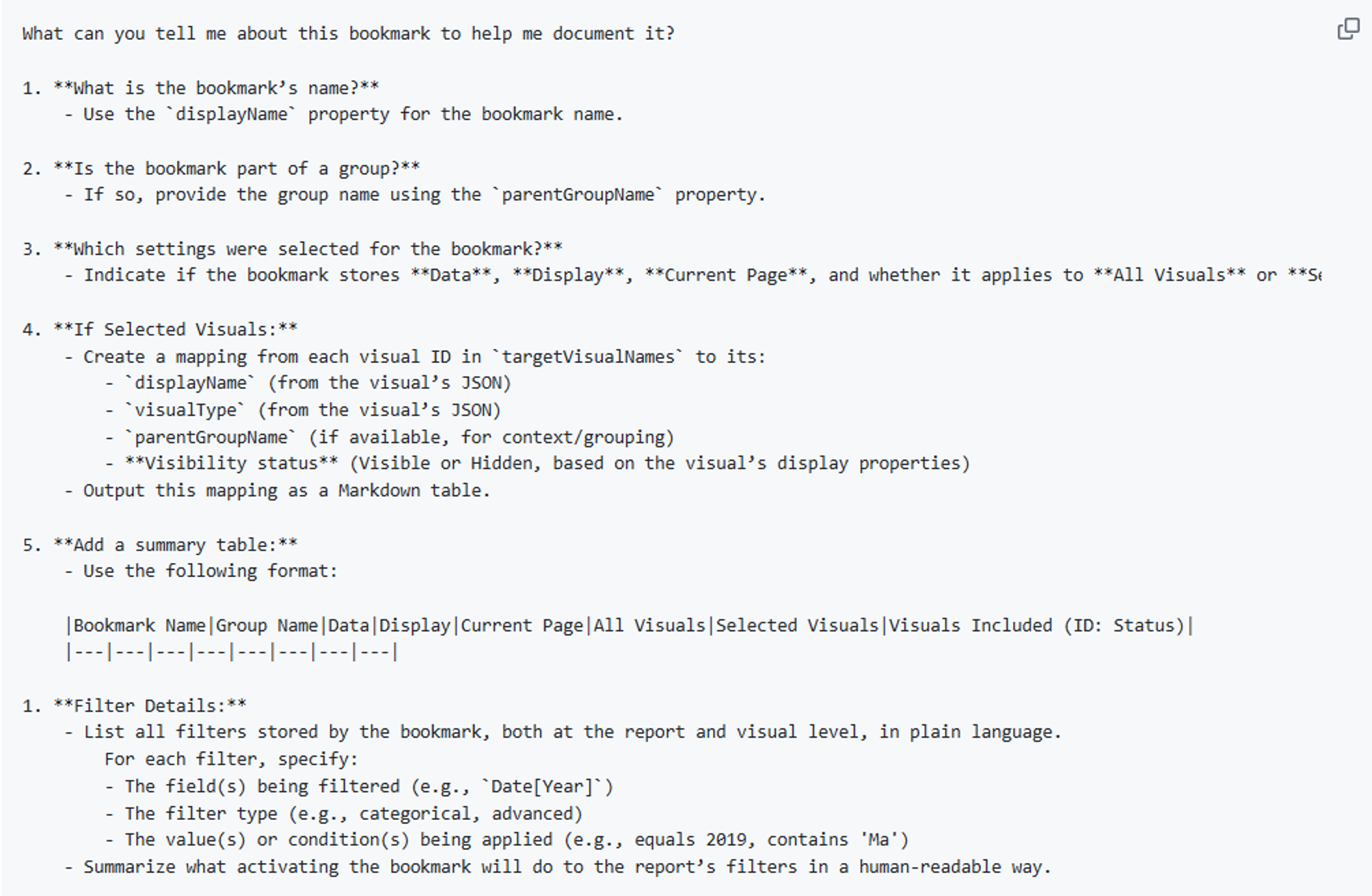
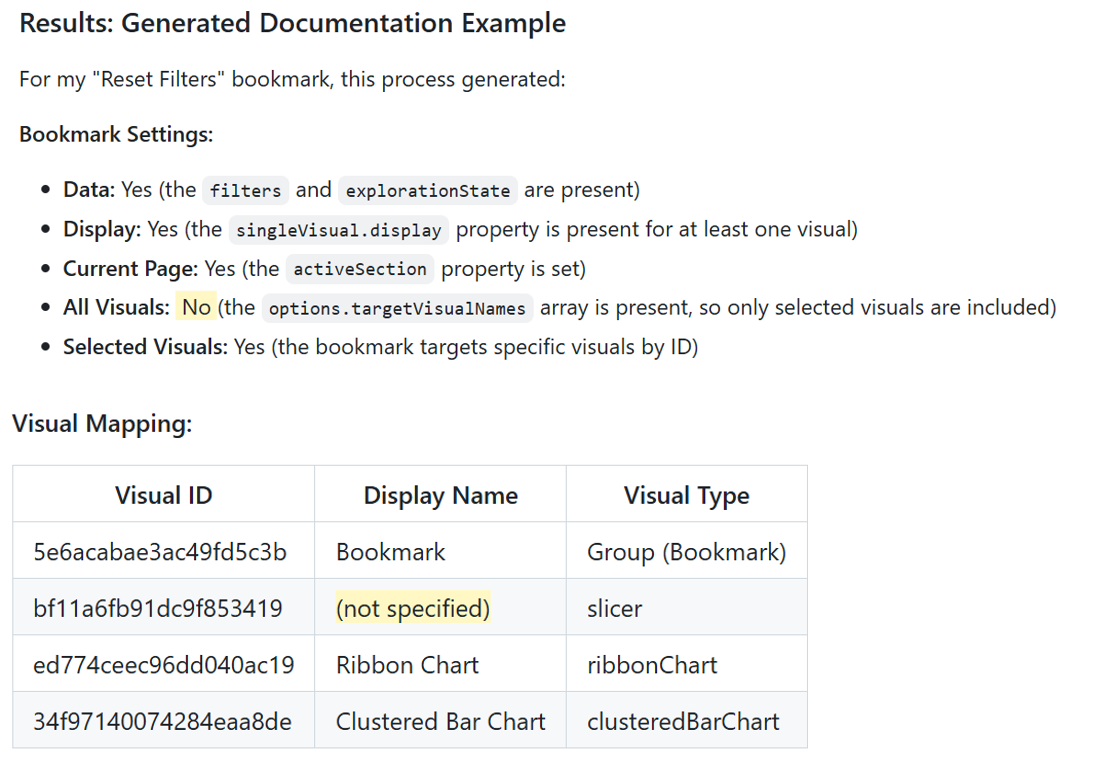
[!WARNING] Automation alone does not fix the functional layer. If people write inconsistent, half-empty descriptions, you just publish inconsistent, half-empty descriptions faster.
So a skill interviews the author and captures the functional information. It reads the bookmark, then asks focused questions, one topic at a time.
What is the business purpose? Who is the user? What should happen?
The important part is what it does when the answer is thin. If there is not enough context, it asks again. It has a sense of what “good enough” looks like, and it will not settle for “TBD” or a one-word reply.
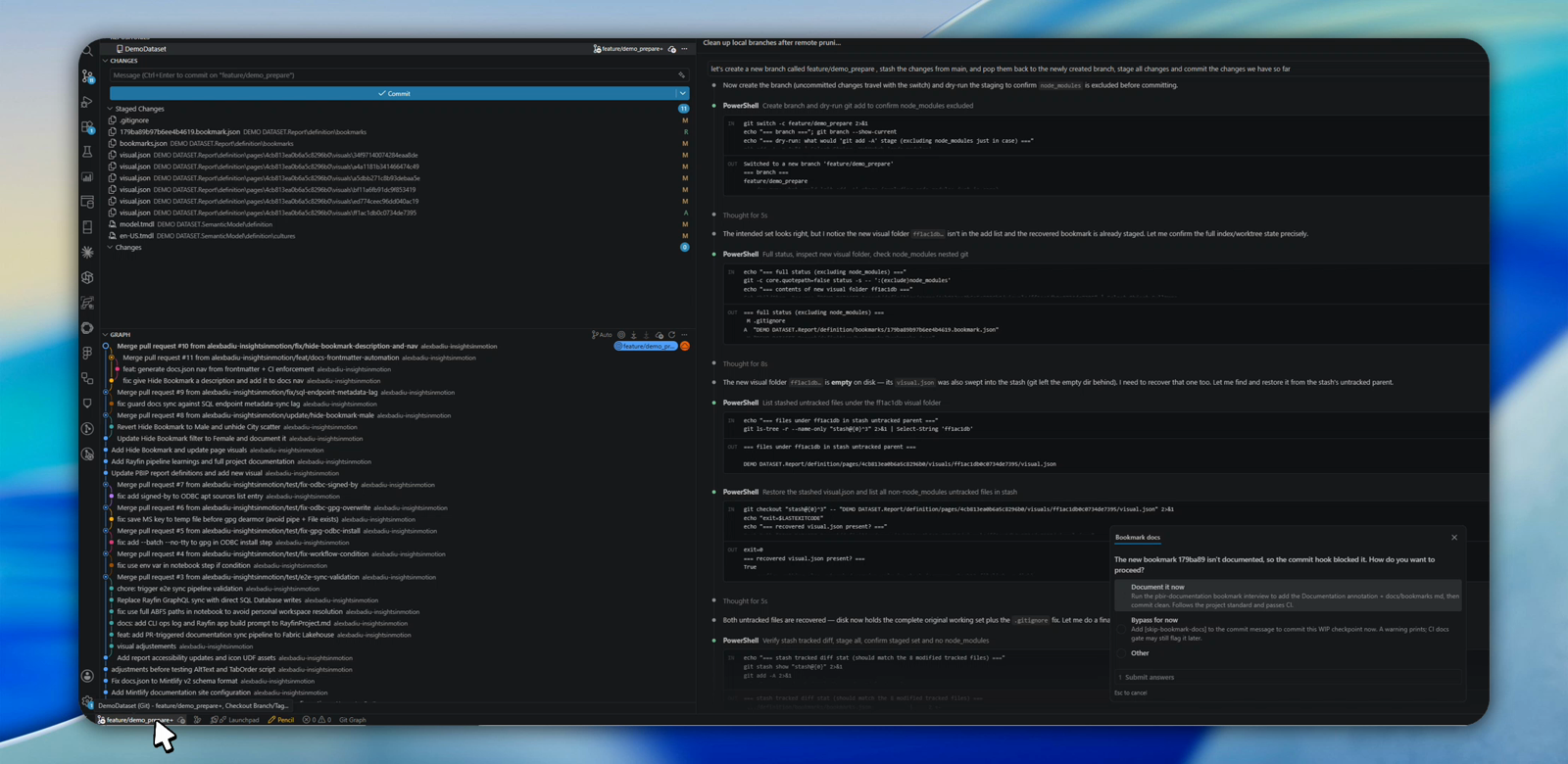
Even better, a prehook will block you to commit your new changes (if using AI for commits) if you do not document first your bookmarks or visual calculations. It’s a pretty nifty use case I must say. You do not even need to “remember” to document, the system tells you when it should be done.
Now it looks like a scalable process for documentation!
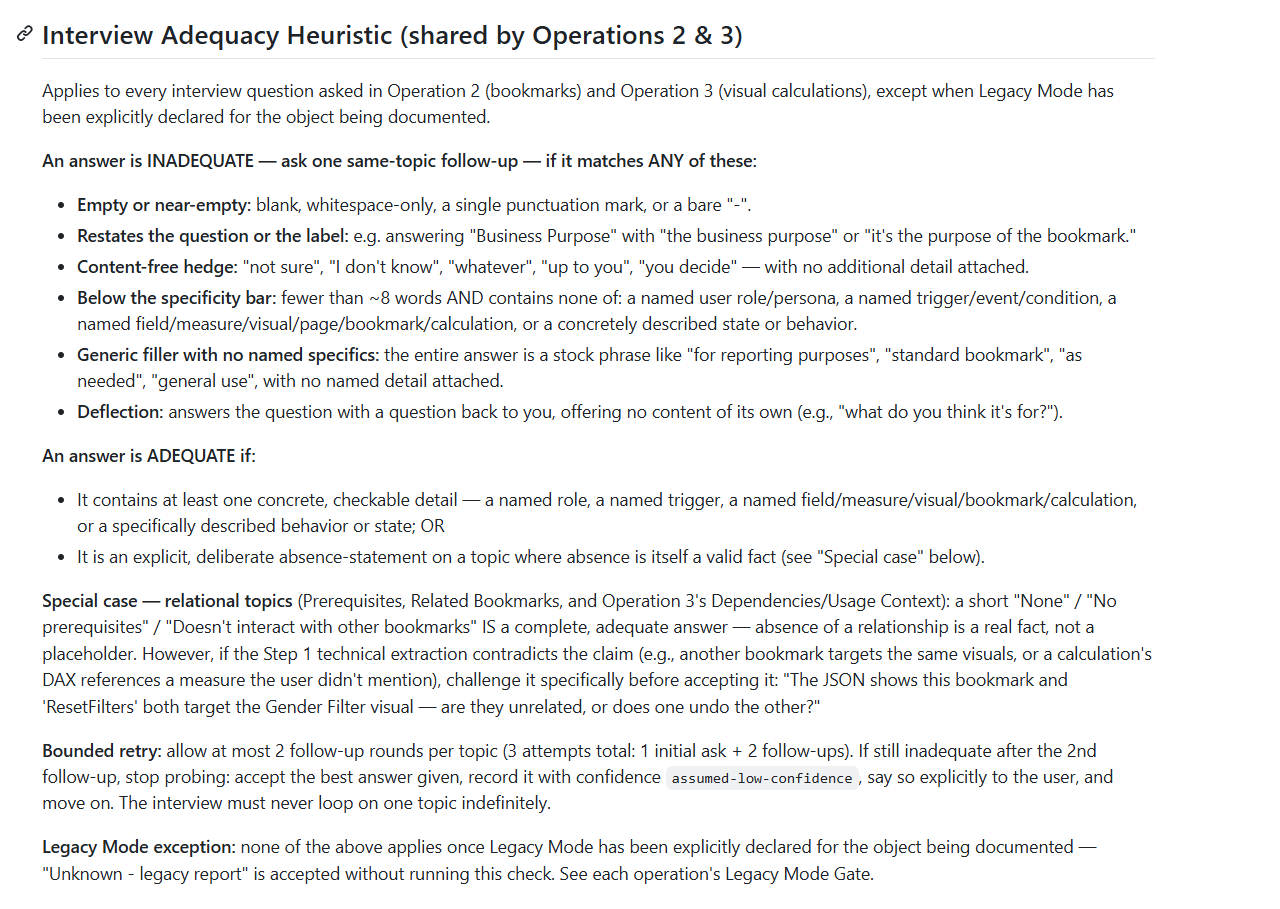
The annotation it generates, after validation, lives inside the report JSON file, so it travels with the report instead of drifting off into a separate wiki. A guided skill does the writing: it asks what the bookmark is for, when someone would use it, what should happen when clicked, and then writes two things:
- A structured annotation into the report JSON.
- A matching Markdown page with the frontmatter to place it in the navigation.
Notice the direction of truth: if someone forgets the page’s description, the generator pulls it from the annotation automatically. The JSON is authoritative; the Markdown page is a projection of it, not an independent document.
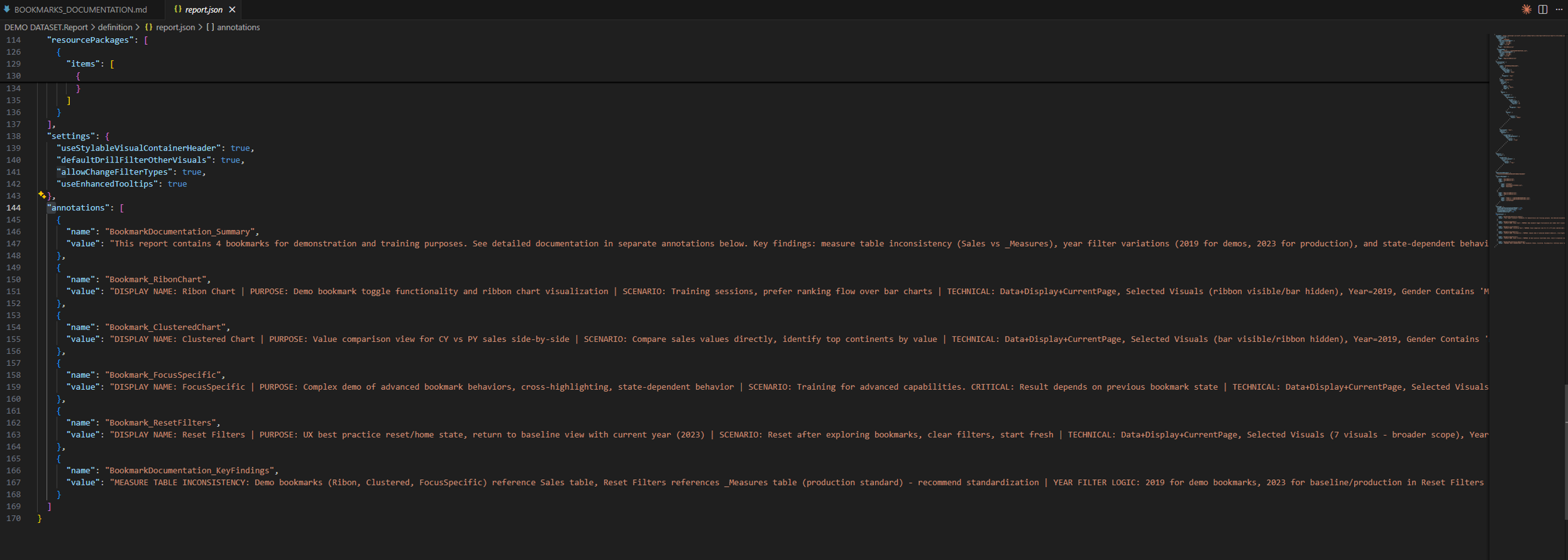
And two quality gates back this up.
✅ A local gate blocks a commit if a bookmark’s documentation is missing or full of placeholders.
✅ A cloud gate (on GitHub) re-runs the same checks on every pull request, so nothing incomplete ever reaches the main branch.
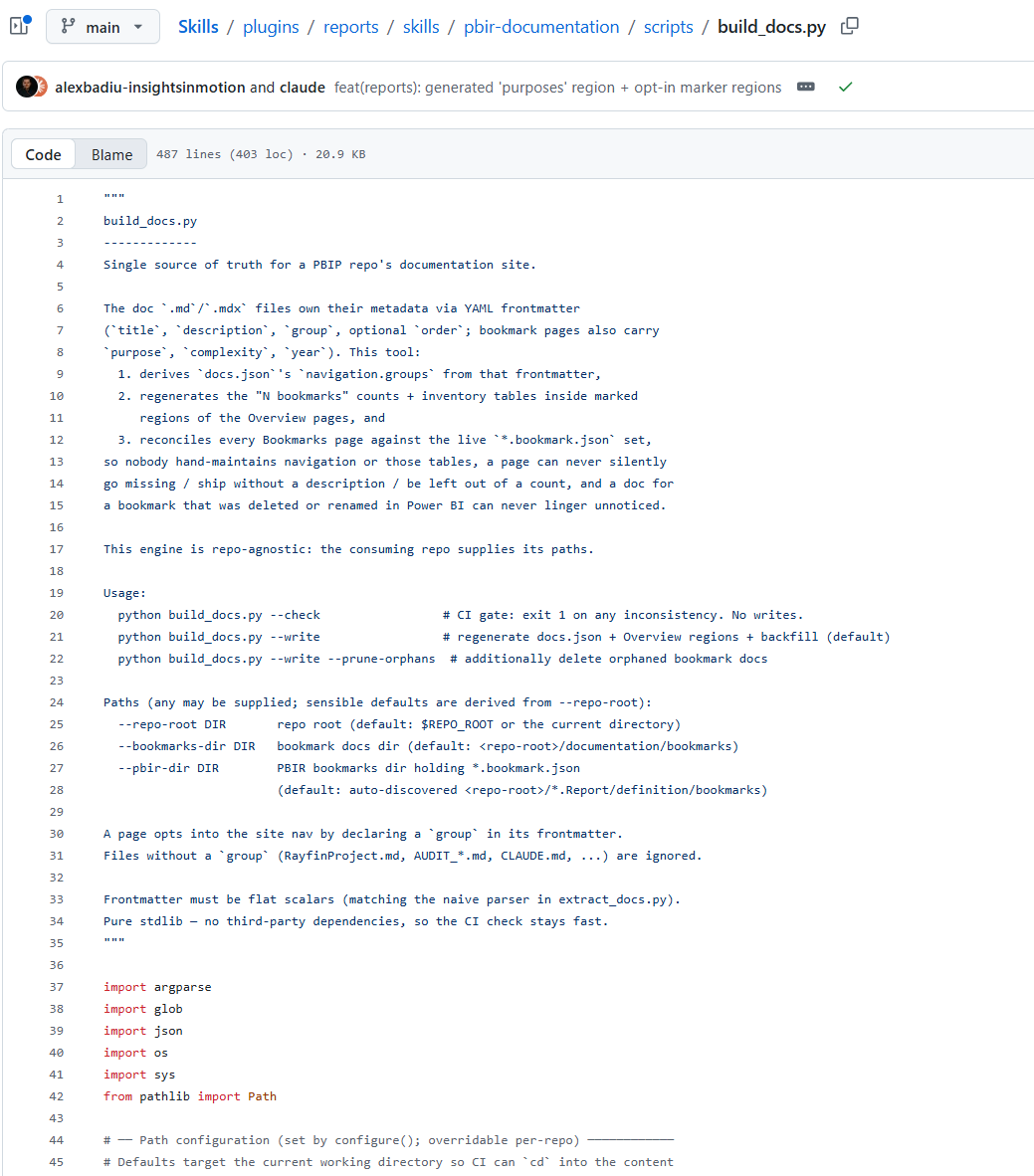
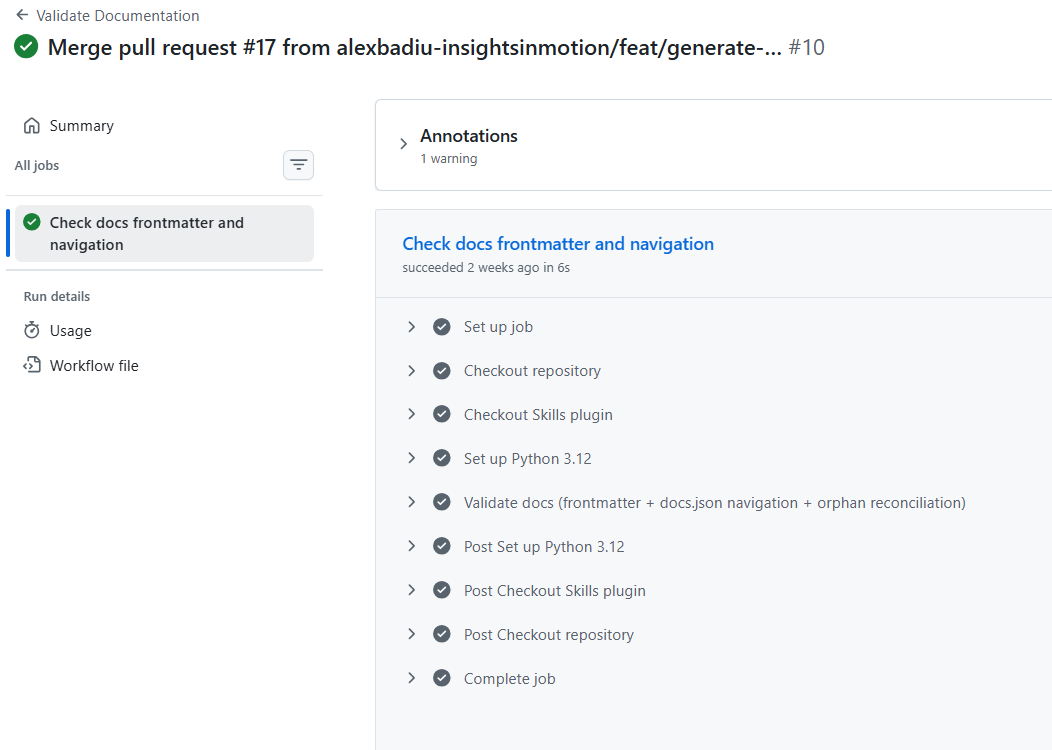
The result is standardization by construction.
The docs are not just always fresh.
The skill and the gates keep every entry shaped the same way,
and neither accepts anything less.
[!TIP] Ask your documentation tool to challenge you, not just record you. A skill that pushes back on a weak answer produces better docs than one that accepts whatever you type.
From files to a living app
Here is where it stops being a docs folder and starts being a product.
Because the pipeline extracts everything, not just the pages, the app can show far more than prose. It captures the documentation pages, the semantic model measures, the tables and relationships, and every report visual with its accessibility metadata. All of it lands in Fabric as structured tables.
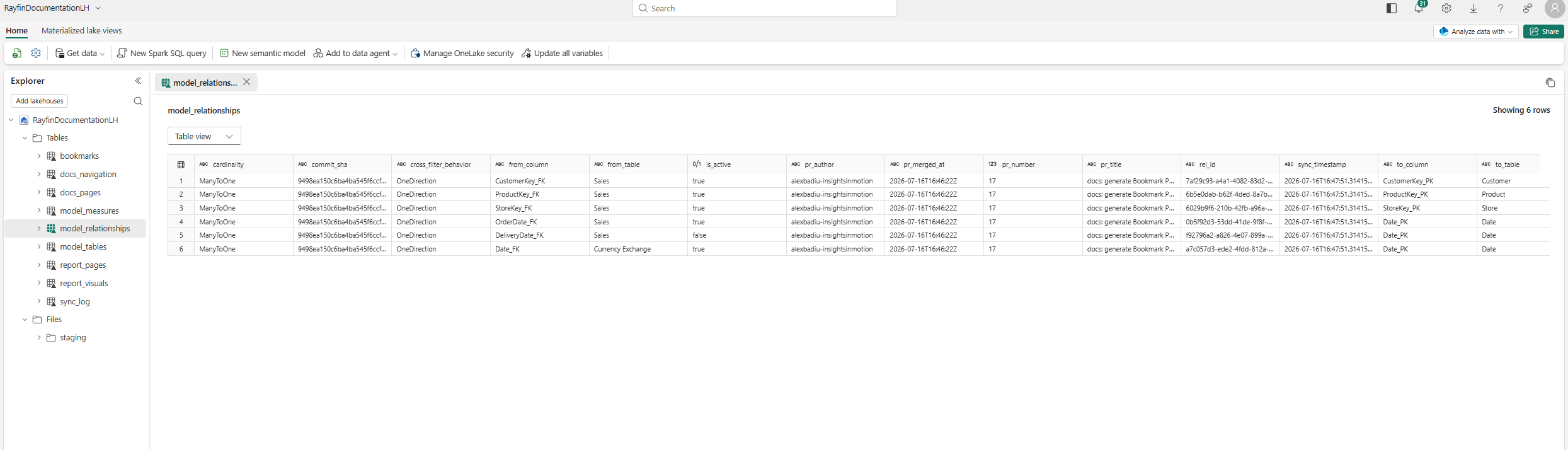
The app reads those tables and turns them into views:
- A searchable measure catalog.
- A model overview with relationships.
- A report visual inventory that flags visuals missing alt text.
- Bookmark deep-dives with the functional “why” attached.
- A “last synced” badge so anyone can see how fresh the data is.
This is the real unlock.
You did not build a full application stack.
You wrote documentation and defined a pipeline.
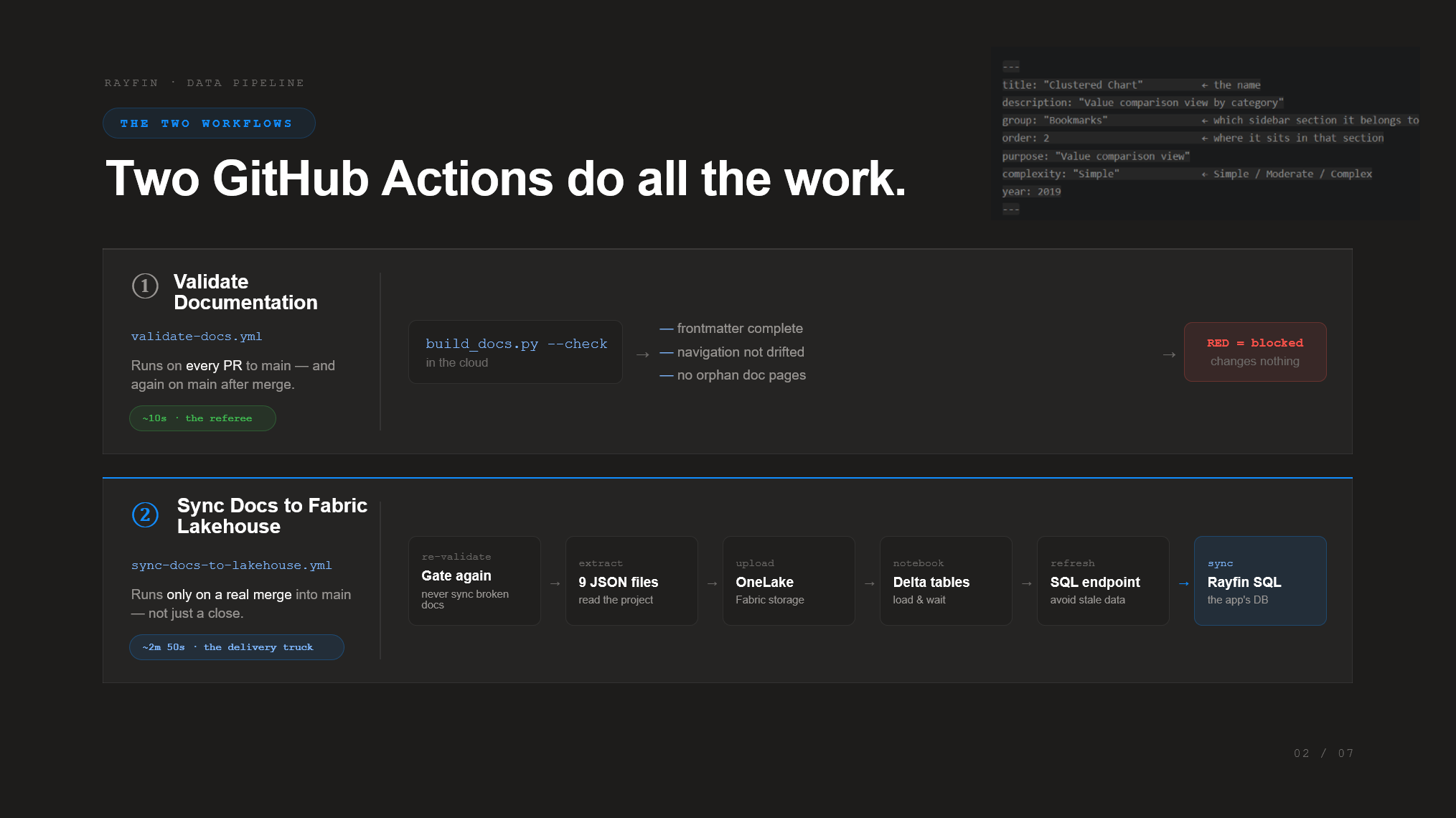
There are only two GitHub Actions doing all the work, and it helps to hold them apart.
The first, Validate Documentation, is the referee: it runs on every Pull Request and again on main after merge, running build_docs.py --check in the cloud. Its whole job is to confirm the docs are complete and consistent: frontmatter filled in, navigation not drifted, no orphan pages pointing at bookmarks that no longer exist. If anything’s wrong the run goes red and the merge is blocked. It changes nothing; it only checks (that’s why it’s the fast ~10-second run).
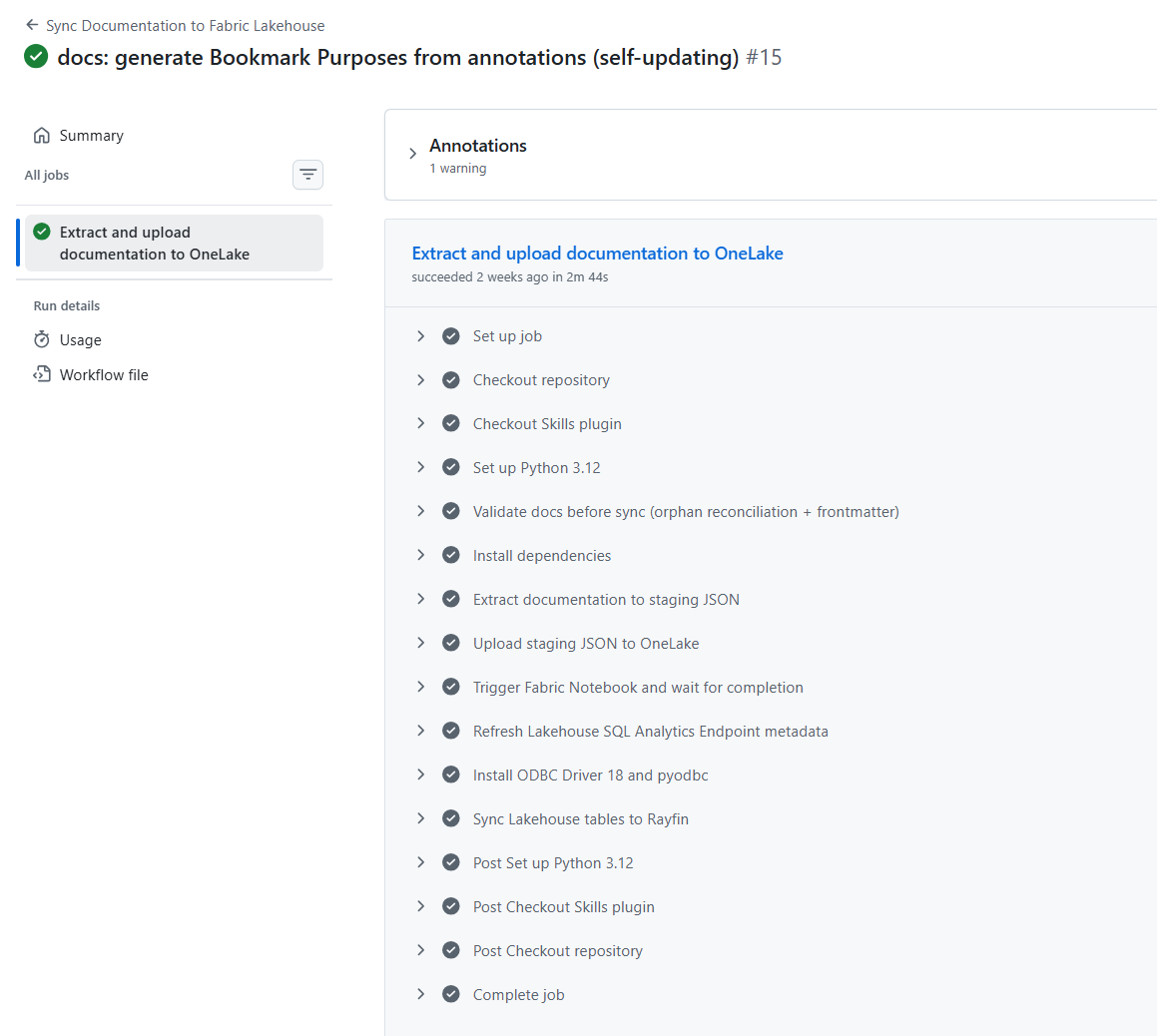
The second, Sync Documentation to Fabric Lakehouse, is the delivery truck. It runs only when a PR is actually merged into main, and it’s the whole ingestion relay in order: re-run the validation gate so we never sync broken docs, extract the project into nine JSON files, upload them to OneLake, run the Fabric notebook to load Delta tables and wait for it, refresh the SQL endpoint so it isn’t stale, then sync everything into the Rayfin App’s SQL database. That’s the slower ~2m 50s run, because it moves data all the way into Fabric.
The app is what you get for free at the end of it. A repository quietly became an internal knowledge portal that updates itself.
Lessons from building it
None of this was smooth. The pipeline looks the way it does because it hit real walls, and each odd step is a fix for one of them. If you build something similar, expect these.
Lesson 1: The app’s normal front door rejects machines. The Rayfin GraphQL layer only accepts a human login, and refuses the service principal that automation uses. So the pipeline bypasses it and writes straight to the SQL database. GraphQL is a read path for people, not a write path for machines.
Lesson 2: “The job finished” does not mean “the data is visible.” The Fabric SQL endpoint catches up to new data in the background, not instantly. On one merge, a newly added bookmark silently never reached the app, because the sync read the old snapshot. The fix has two layers: force a refresh, then verify the row counts match before overwriting anything, failing loudly rather than overwriting good data with an incomplete set.
Lesson 3: Being workspace Admin is not enough. A Fabric SQL Database has its own separate permission list. Being an Admin over the whole workspace does not open that specific door. You share the database item with the service principal by hand, in the portal, because there is no API for it.
Lesson 4: The database sleeps. Fabric SQL Databases pause when idle, and connections fail until you wake them by opening the item once in the portal. Build a “wake it up” note into your setup steps.
Lesson 5: Let the database create its own IDs. Every table generates its primary key automatically. Trying to insert your own breaks the write. Omit it and let the database do its job.
Lesson 6: Automated build environments have hidden gotchas. A conditional “skip this step” switch would not read a hidden secret directly, so you copy the secret into a normal variable first. Installing the database driver kept failing because it waited for keyboard answers on a machine with no keyboard, so you add flags that say “yes, silently, trust this.” Expect setup friction, and write the fixes down.
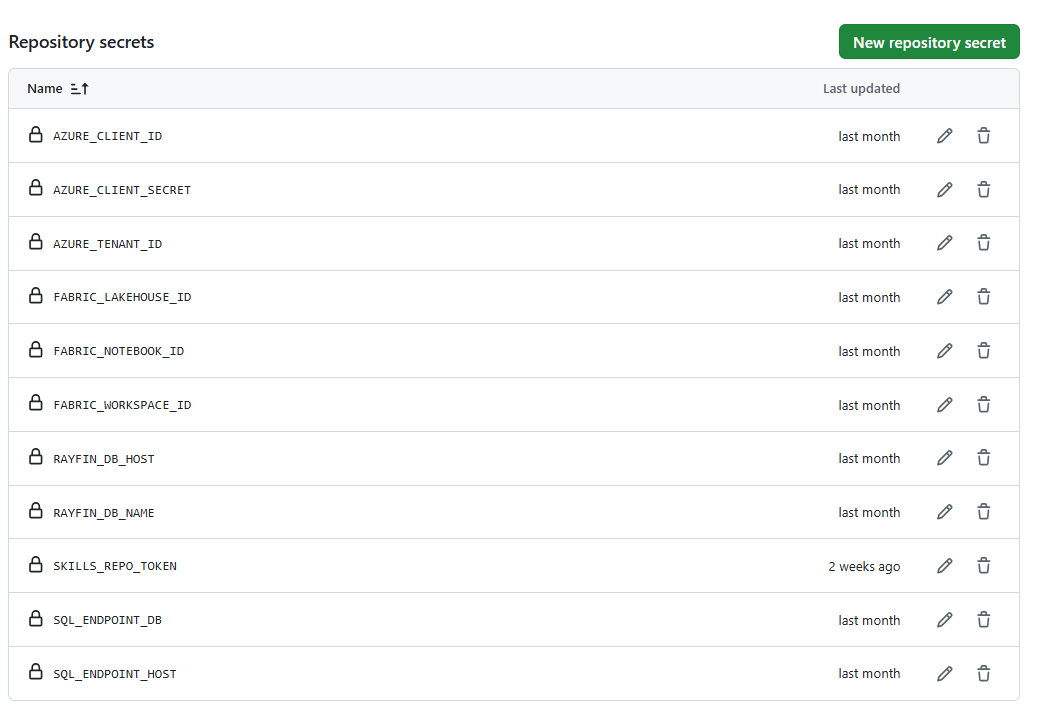
If you take one thing from this section, take this: when you copy a pipeline like this, copy the fixes too, not just the happy path.
The real story: the power of agentic systems
Step back and the pattern is bigger than documentation.
This is not a script that blindly copies files. It is an agentic system. It interviews a human to capture judgment.
It validates its own output and refuses to publish when quality is low. It moves data across three systems, waits for slow steps to actually finish, checks that what it wrote is really there, and fails safely when it is not.
The magic is the split. The deterministic parts, extract, upload, load, sync, run as reliable machinery. A skill handles the parts that need judgment, like “is this functional description good enough?”, and it can push back and ask again.
Machinery where you want reliability. Judgment where you want quality.
Try it yourself. You do not need Fabric to start. Point an AI skill at your own project.
Conclusion
✅ Documentation gets out of date easily because it is a snapshot. Make it output of the repository, rebuilt on every merge.
✅ The functional “why” is the real loss. Capture it with a skill that interviews you and asks again when context is thin.
✅ Two gates keep it correct. One local, one in the cloud, so nothing incomplete reaches the main branch.
✅ The payoff is a living app. A repository becomes a self-updating knowledge portal, not a folder people forget.
✅ The odd steps are lessons, not clutter. Each fix came from a real failure worth documenting. It will only become simpler. I already created 2 Microsoft ideas to facilitate the documentation directly in Power BI without “think outside the box” and consider the use of annotations.
Make sure to give a thumbs up here:
- Add Description field for Bookmarks in Power BI Desktop and PBIR - Microsoft Fabric Community
- Dynamic Visual Visibility via DAX Expression (extend isHidden) - Microsoft Fabric Community
💬 Drop your thoughts in the LinkedIn post.